Home / Laravel Scripts / Laravel BusTicket Plus

Laravel Busticket App

Download the free version

BusTicket Plus – Online Bus Ticket Booking Laravel Script

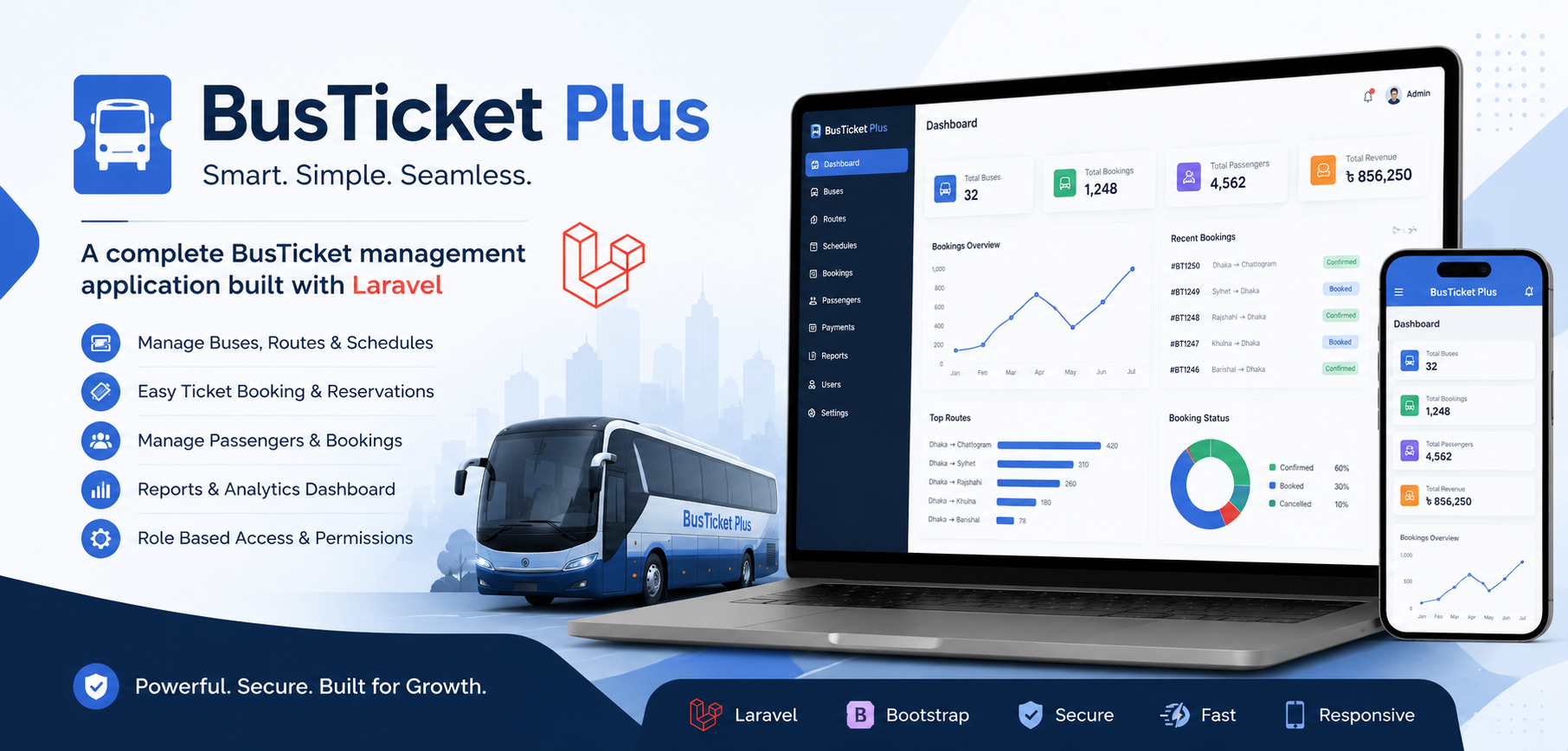
Laravel BusTicket Plus is a complete online bus ticket booking and management system built with Laravel. It enables bus operators to manage routes, schedules, seat layouts, bookings, passengers, and payments from a modern dashboard. Customers can search trips, select seats, make online payments, and receive booking confirmations instantly. Perfect for bus companies, travel agencies, and transportation businesses looking to digitize ticket sales and streamline operations.

Starting at

$49.00 $19.00 /year

or $199.00 $99.00 lifetime

Secure
Checkout

Instant
Delivery

Digital
Download

14 Days
Money Back

Free Install
On Request

Software for Ticket Sale in Bus – A Powerful RedBus Alternative

Looking for reliable software for ticket sale in bus services? BusTicket Plus is a complete Laravel-based bus ticket booking and reservation solution designed for bus operators, travel agencies, transport companies, and entrepreneurs who want to launch their own online ticketing platform. It provides everything you need to manage bus routes, schedules, fleets, seat layouts, passenger bookings, online payments, and digital PNR tickets from one centralized system.

A Flexible RedBus Alternative for Your Bus Business

BusTicket Plus can be used as a RedBus alternative for businesses that want to build and operate their own bus ticket booking website instead of depending entirely on a third-party marketplace. Customers can search available trips, view schedules, select their preferred seats using a visual seat selector, complete their booking, and receive their ticket after payment. Meanwhile, administrators can manage buses, routes, trips, pricing, bookings, payments, and other important operations through the admin dashboard.

Built with Laravel 12, the platform includes customizable seat layouts, multiple payment options such as Stripe, Razorpay, SSLCommerz, and cash payments, responsive booking pages, email notifications, and a built-in CMS. This makes BusTicket Plus suitable for businesses that need scalable bus ticket booking software with the flexibility to customize the system according to their own brand and transportation operations.

Whether you are starting an online bus ticketing business, digitizing an existing bus company, or building a booking platform similar to large online bus marketplaces, BusTicket Plus provides the foundation to sell bus tickets online and manage your complete booking operation from your own platform.

Pricing

Choose your license

Transparent pricing. Instant delivery after purchase.

Per Year

Renews annually

Flexible
$49.00 Special
$19.00 /year

Instant digital download

  • 12 months of updates & support
  • Free installation on request
  • 7-day return policy
  • Instant digital download

Lifetime

Pay once, own forever

Best value
$199.00 Special
$99.00 one-time

Instant digital download

  • Lifetime updates & support
  • Free installation on request
  • 14 days money back guarantee
  • Instant digital download
Laravel Script

BusTicket Plus — Product Specification

A production-ready single-vendor bus ticket booking platform. Customers search trips, choose seats, pay online or with cash, and print boarding passes. Admins manage operators, fleet, routes, schedules, bookings, CMS, staff permissions, payments, and optional AI report insights.
Laravel 12 PHP 8.2+ Database MySQL / MariaDB Payments Stripe · Razorpay · SSLCommerz · Cash Installer /install

End-to-end booking

Search → seats → pay → ticket

Seat builders

Preset layouts + paint canvas

Multi-gateway pay

Stripe, Razorpay, SSLCommerz, Cash

Operators & fleet

Buses, layouts, maintenance status

Routes & trips

Schedules, fares, occupancy

Boarding points

Boarding & dropping per route

Staff RBAC

Module View / Create / Edit / Delete

CMS & blog

Pages, posts, rich editor

SEO & menus

Per-page meta, header nav, social

SMTP & templates

Branded booking emails

Reports & CSV

Revenue, routes, payment mix

AI insights

Optional OpenAI report analysis

Web installer

Requirements → DB → admin + demo

Digital tickets

PNR, QR, print boarding pass

Coupons

Discount codes at checkout

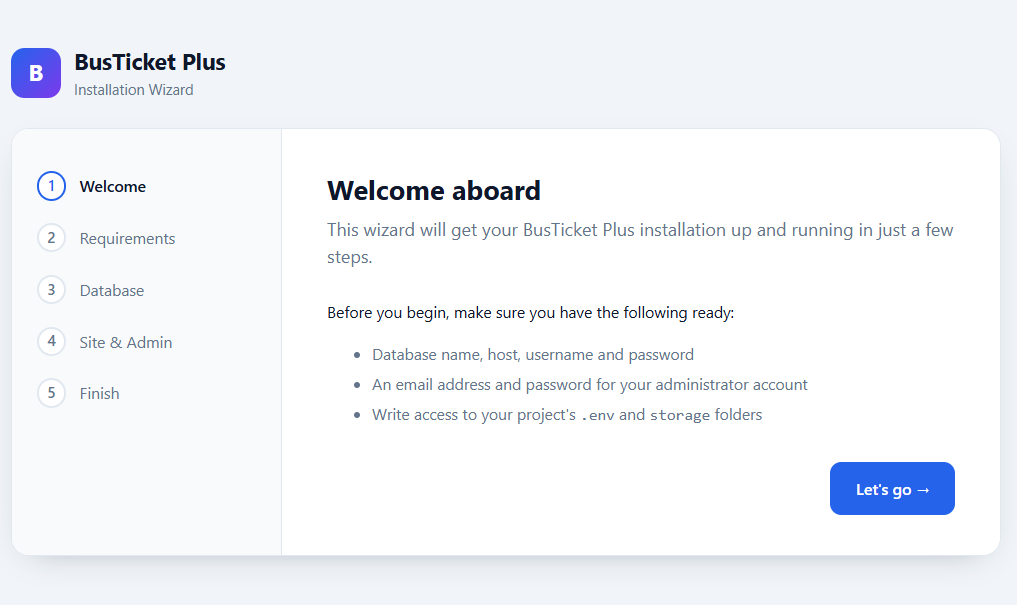
BusTicket Plus installation wizard welcome step
Installation

Web installer — welcome

Open /install after uploading the project. The guided wizard walks you through requirements, database, and the first admin account.

  1. Upload project.zip, unzip, and point the vhost document root to public/.
  2. Run composer install --no-dev if vendor is not bundled.
  3. Visit https://your-domain.com/install.
  4. Have database credentials, admin email/password, and write access to .env and storage/ ready.
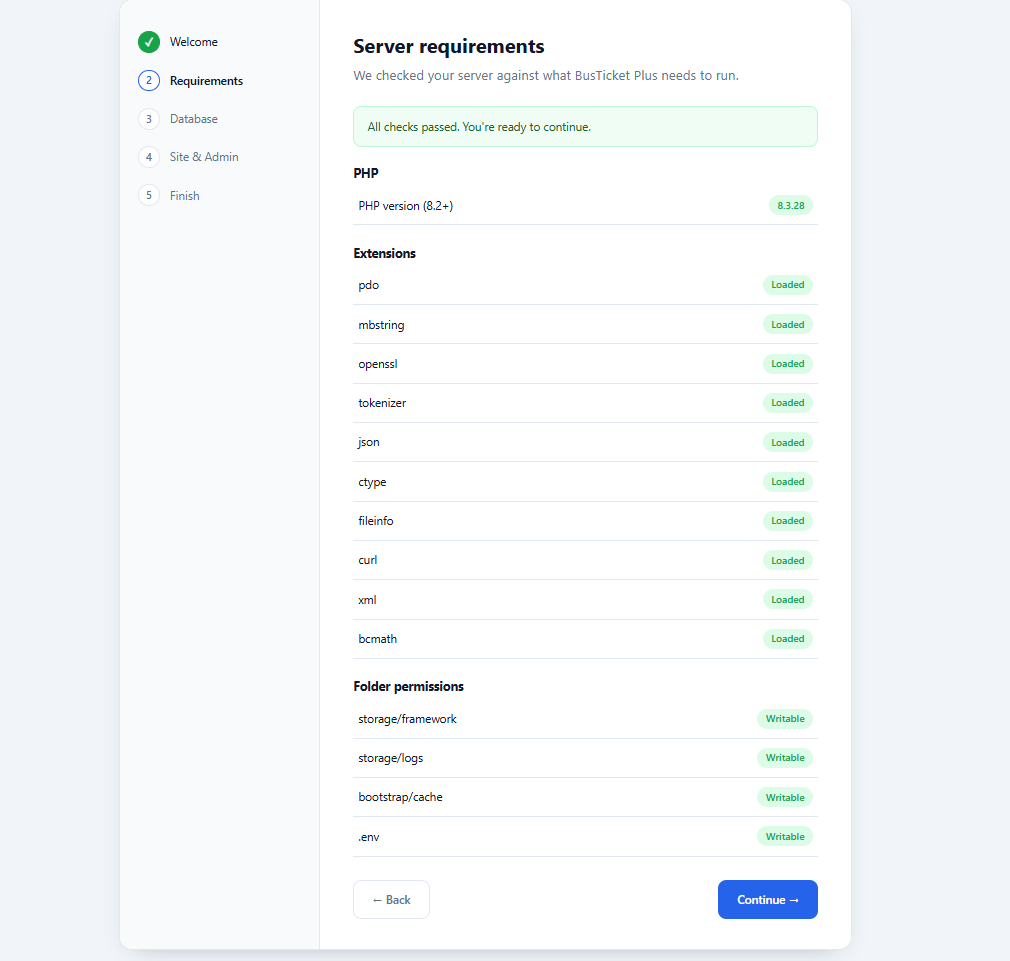
Server requirements check during installation
Installation

Server requirements check

The installer verifies PHP version, required extensions, and writable folders before continuing.

  • PHP 8.2+ with a clear pass/fail status.
  • Extensions: pdo, mbstring, openssl, tokenizer, json, ctype, fileinfo, curl, xml, bcmath.
  • Writable paths: storage/framework, storage/logs, bootstrap/cache, .env.
  • Green Loaded / Writable badges confirm each check.
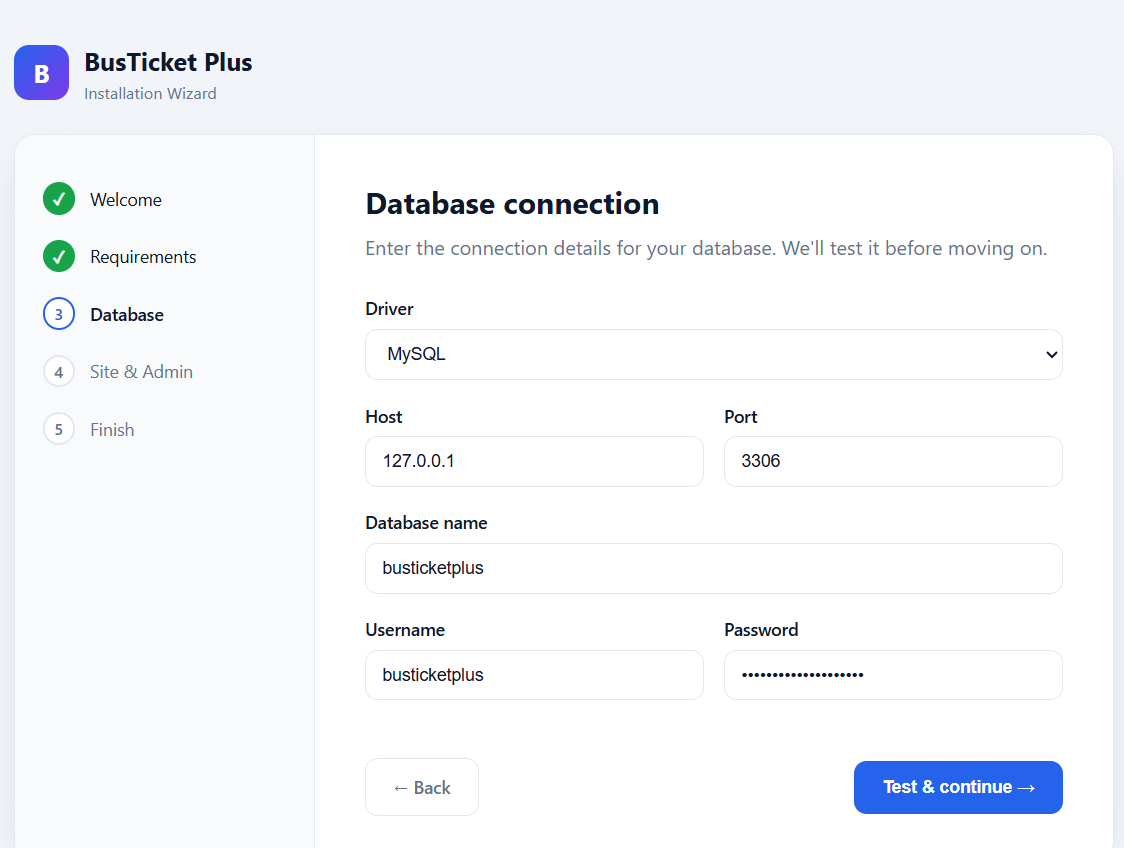
Database connection step in the installer
Installation

Database connection

Enter MySQL (or compatible) connection details. The wizard tests the connection before you proceed.

  • Driver, host, port, database name, username, and password.
  • Test & continue validates credentials before writing .env.
  • Supports typical shared-hosting and VPS MySQL setups.
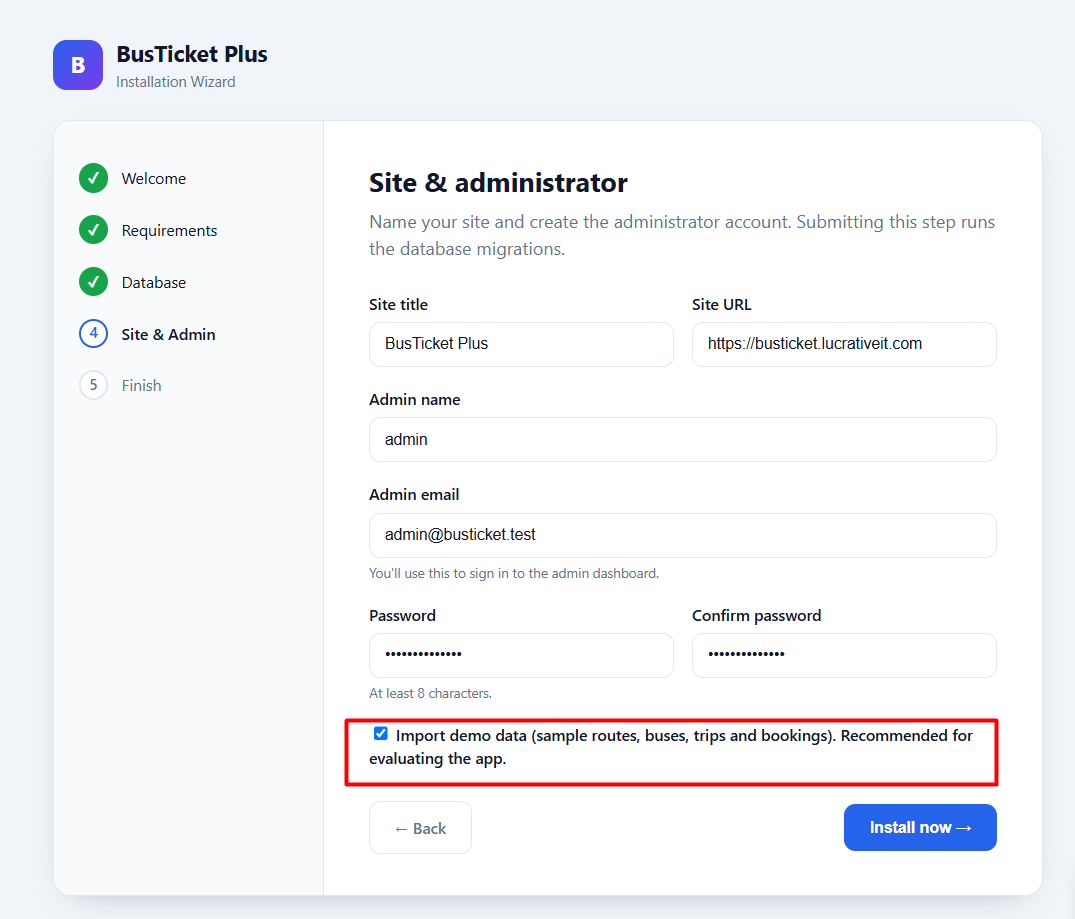
Site and administrator setup with demo data option
Installation

Site title & administrator

Name the site, set the public URL, and create the first admin. Submitting this step runs migrations.

  • Site title and site URL used across frontend and tickets.
  • Admin name, email, and password (min. 8 characters).
  • Optional Import demo data — sample routes, buses, trips, and bookings for evaluation.
  • Creates storage/app/installed.lock when finished — keep it in production.
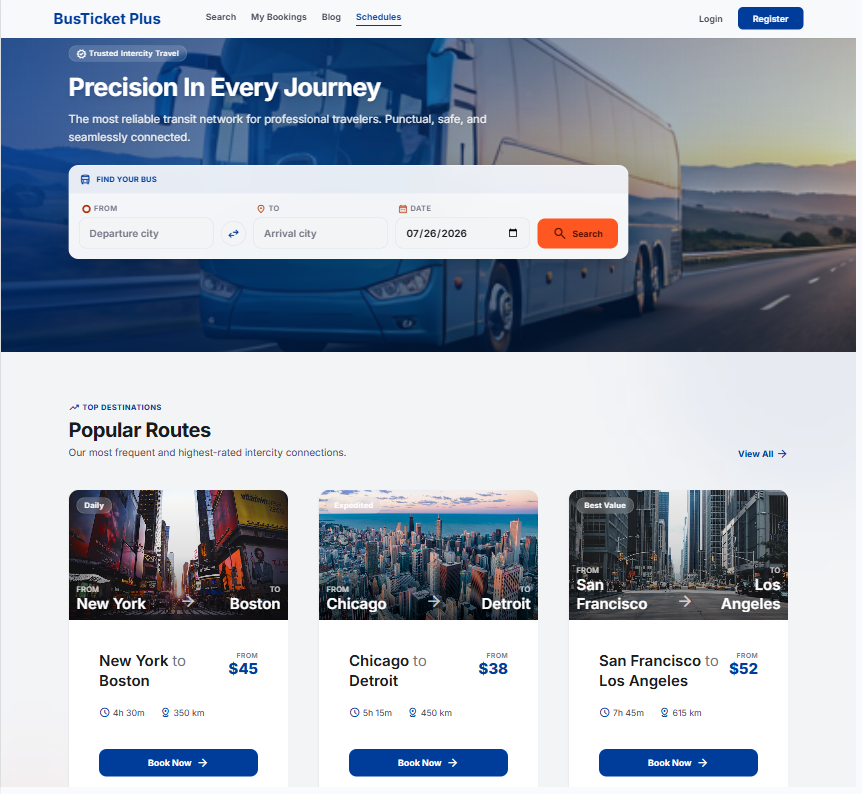
BusTicket Plus customer homepage with search widget
Frontend

Branded homepage & trip search

A full-bleed hero, trust messaging, and a floating search card let travelers find buses in one step.

  • From / To / Date search with city swap and calendar picker.
  • Popular Routes cards with duration, distance, starting price, and Book Now.
  • Header links for Search, My Bookings, Blog, Schedules — plus Login / Register.
  • Hero title, subtitle, and SEO are editable under Settings → General.
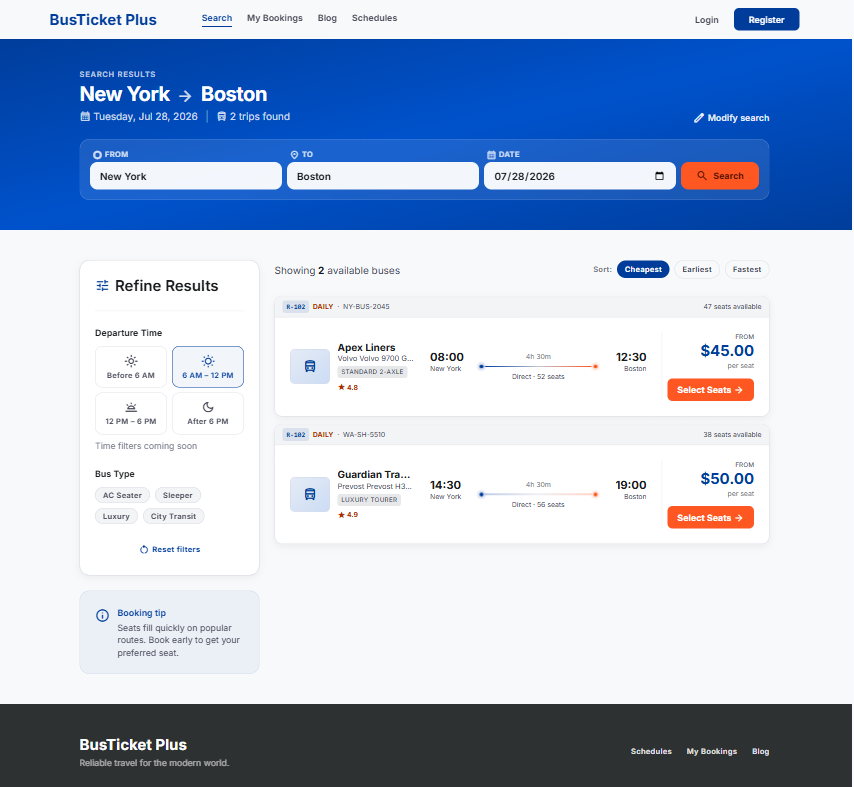
Bus search results with filters and trip cards
Booking flow

Search results with filters

After search, customers refine trips by departure window and bus type, then sort by cheapest, earliest, or fastest.

  • Result header shows route, travel date, and trip count; modify search anytime.
  • Refine: Before 6 AM, morning, afternoon, evening; AC Seater, Sleeper, Luxury, City Transit.
  • Trip cards show operator, bus model, rating, timeline, seats left, and price.
  • Orange Select Seats CTA continues into the seat map.
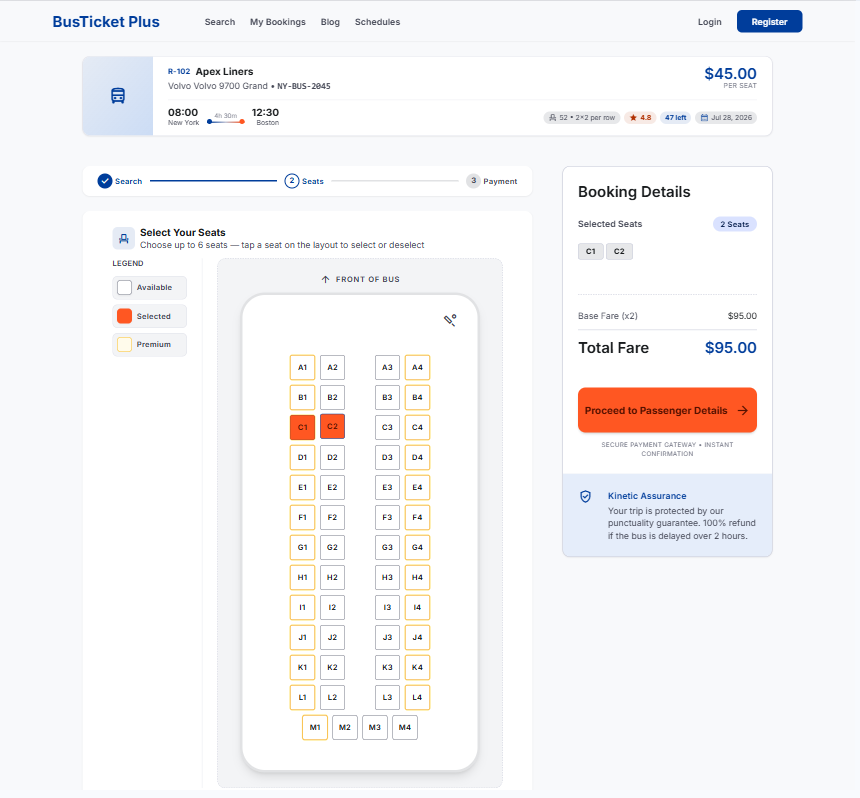
Interactive seat selection with booking details sidebar
Booking flow

Interactive seat map

Passengers pick seats on a visual bus layout with clear availability states and a live booking sidebar.

  • Trip summary: operator, bus, route times, capacity, rating, seats remaining.
  • Legend for Available, Selected, and Premium seats; max seats per booking enforced.
  • 2×2 (and other) layouts with aisle; selected seats highlighted in orange.
  • Sidebar shows selected seats, fare total, and Proceed to Passenger Details.
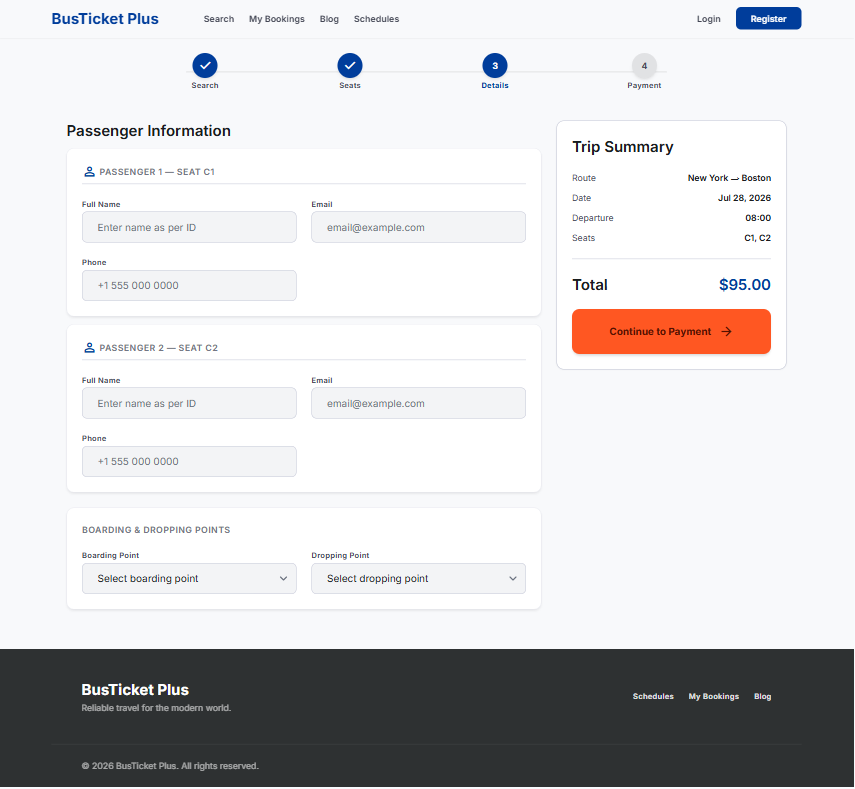
Passenger information and boarding point form
Booking flow

Passenger information

Collect per-seat passenger details plus boarding and dropping points before payment.

  • One form card per seat: full name, email, phone.
  • Boarding & Dropping Points dropdowns from the route catalog.
  • Sticky trip summary with route, date, departure, seats, and total.
  • Progress stepper keeps Search → Seats → Details → Payment clear.
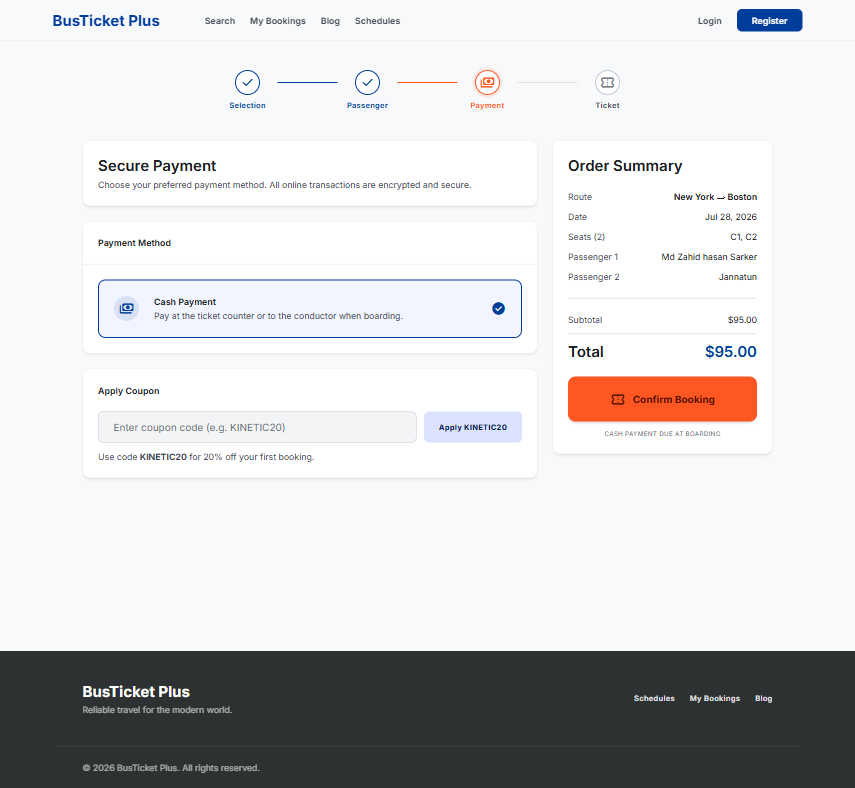
Secure payment step with cash option and coupon
Booking flow

Secure payment & coupons

Checkout lists enabled gateways (cash, Stripe, Razorpay, SSL Commerz) with an order summary and optional coupon.

  • Payment method cards with description (e.g. pay at counter / on boarding).
  • Apply coupon codes (e.g. first-booking discounts).
  • Order summary: route, date, seats, passenger names, subtotal, total.
  • Confirm Booking creates the PNR and moves to confirmation.
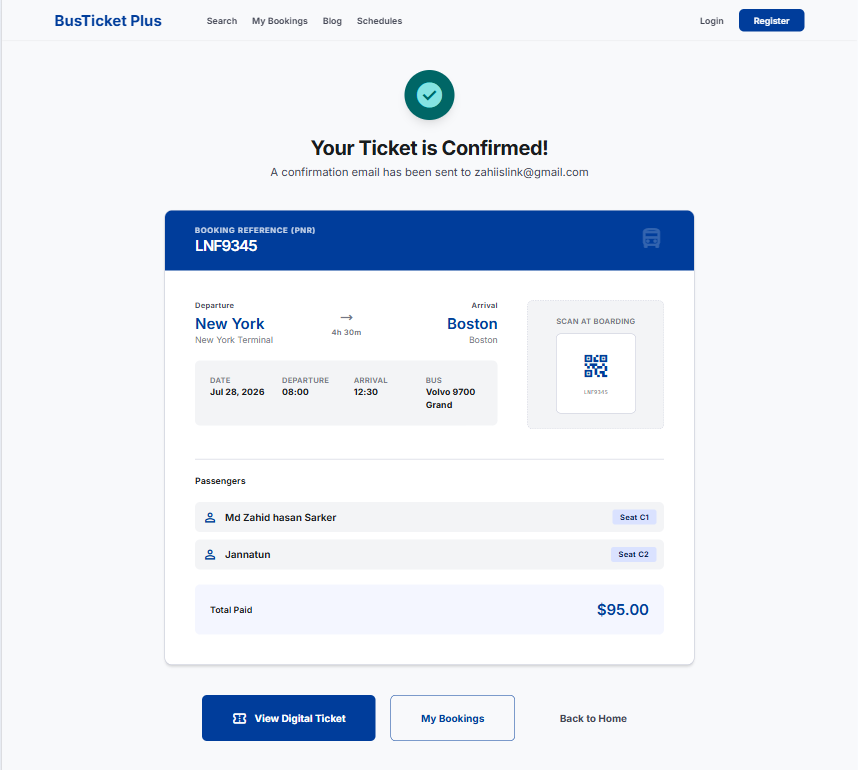
Booking confirmation with PNR and QR code
Booking flow

Booking confirmation

Success screen shows PNR, route terminals, times, passengers, QR for boarding, and total paid.

  • Confirmation email notice to the primary passenger address.
  • PNR banner, trip grid (date, departure, arrival, bus), and scan-at-boarding QR.
  • Passenger rows with seat badges.
  • Actions: View Digital Ticket, My Bookings, Back to Home.
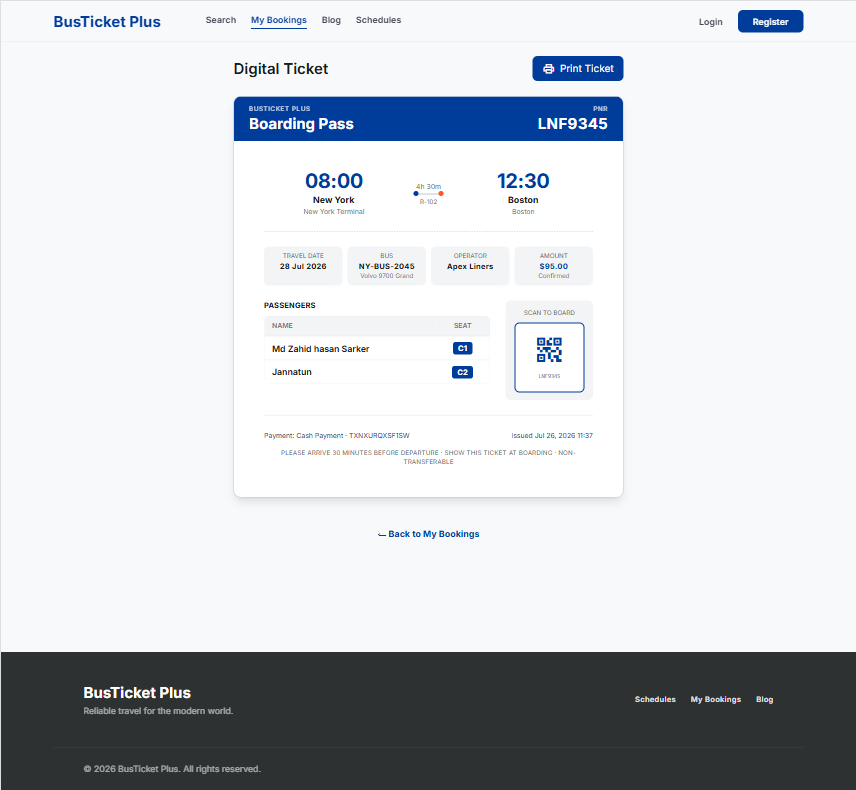
Digital boarding pass ticket with print action
Booking flow

Printable digital ticket

Boarding-pass style ticket ready to print or show on mobile at departure.

  • Header with brand and PNR; timeline for departure → arrival.
  • Travel date, bus plate/model, operator, amount, and status.
  • Passenger name/seat table plus Scan to Board QR.
  • Payment reference, issue time, and boarding instructions; Print Ticket button.
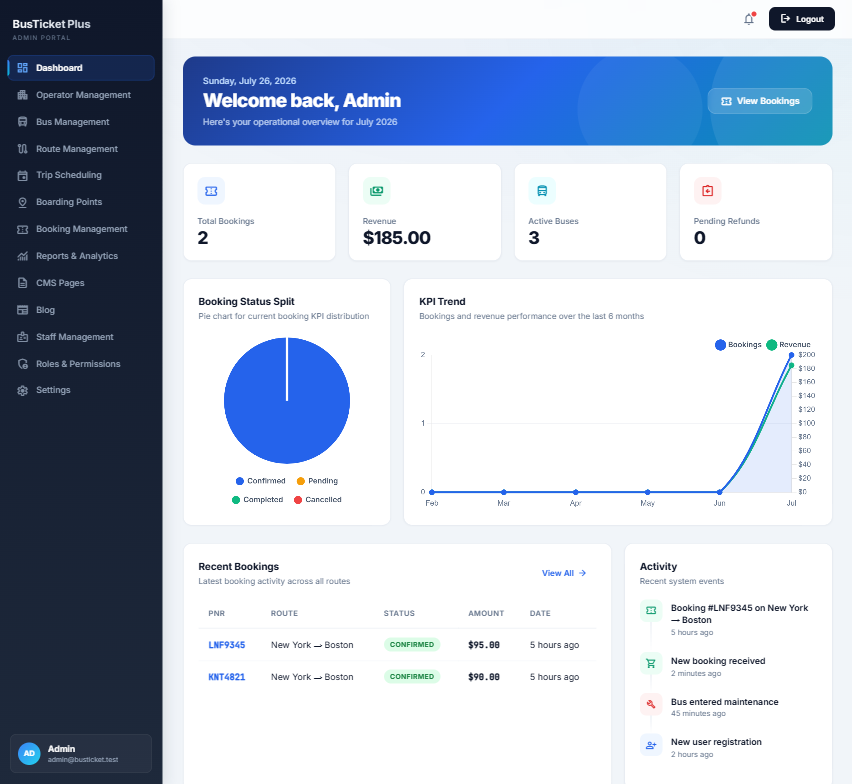
Admin portal dashboard with KPIs and charts
Admin

Operations dashboard

Admins land on an overview of bookings, revenue, fleet health, charts, and recent activity.

  • KPI cards: total bookings, revenue, active buses, pending refunds.
  • Booking status pie and 6-month KPI trend (bookings vs revenue).
  • Recent bookings table (PNR, route, status, amount) and live activity feed.
  • Sidebar covers all modules; notifications and logout in the top bar.
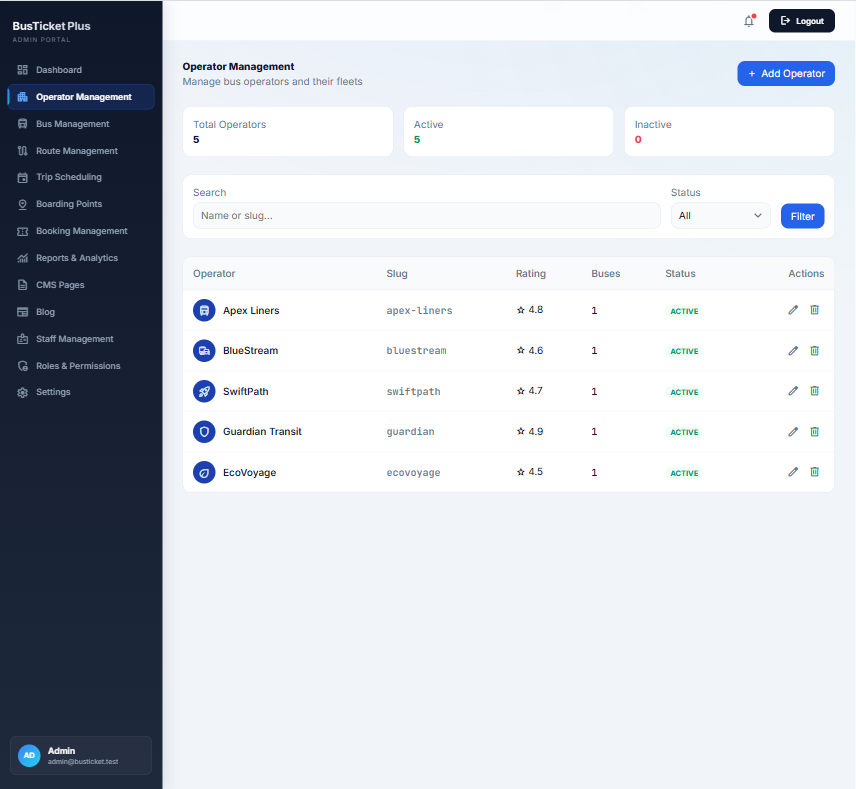
Operator management list in admin portal
Fleet

Operator management

Manage bus operators (brands) that own vehicles and appear on search cards.

  • Summary: total, active, inactive operators.
  • Search by name/slug; filter by status.
  • Table: operator, slug, rating, bus count, status; edit / delete actions.
  • + Add Operator creates a new fleet brand profile.
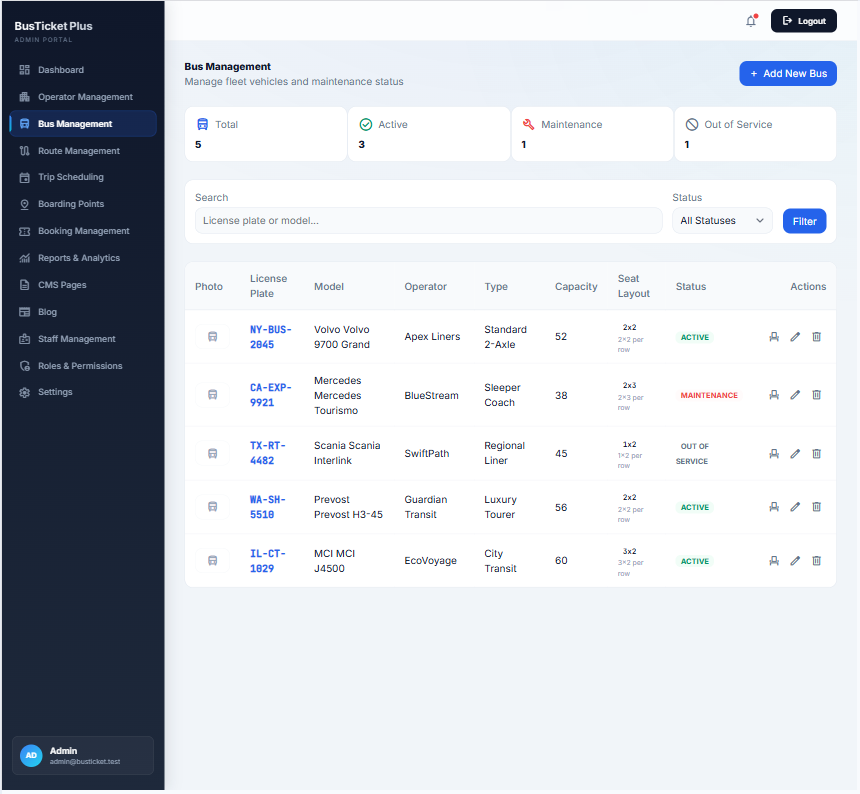
Bus management fleet table
Fleet

Bus & fleet management

Track every vehicle: plate, model, operator, type, capacity, layout, and service status.

  • KPIs for total, active, maintenance, and out-of-service buses.
  • Filter by license plate/model and status.
  • Columns for type (Standard, Sleeper, Luxury…), capacity, and seat layout (e.g. 2×2).
  • Row actions: view seats, edit bus, delete.
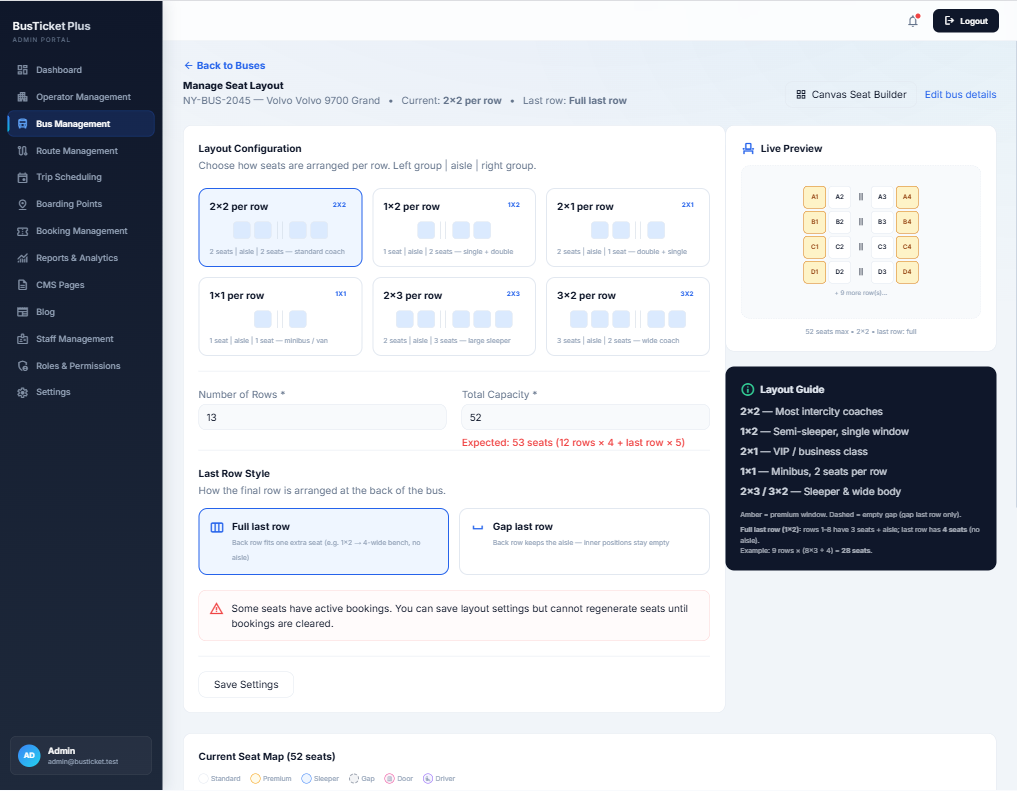
Manual preset seat layout configuration
Fleet

Preset seat layout builder

Configure capacity with preset aisle patterns and a live preview before regenerating seats.

  • Layouts: 2×2, 1×2, 2×1, 1×1, 2×3, 3×2 with use-case labels.
  • Rows, total capacity, and last-row style (full vs gap).
  • Validation when capacity does not match the expected seat count.
  • Blocks regenerating seats when active bookings exist; switch to canvas builder anytime.
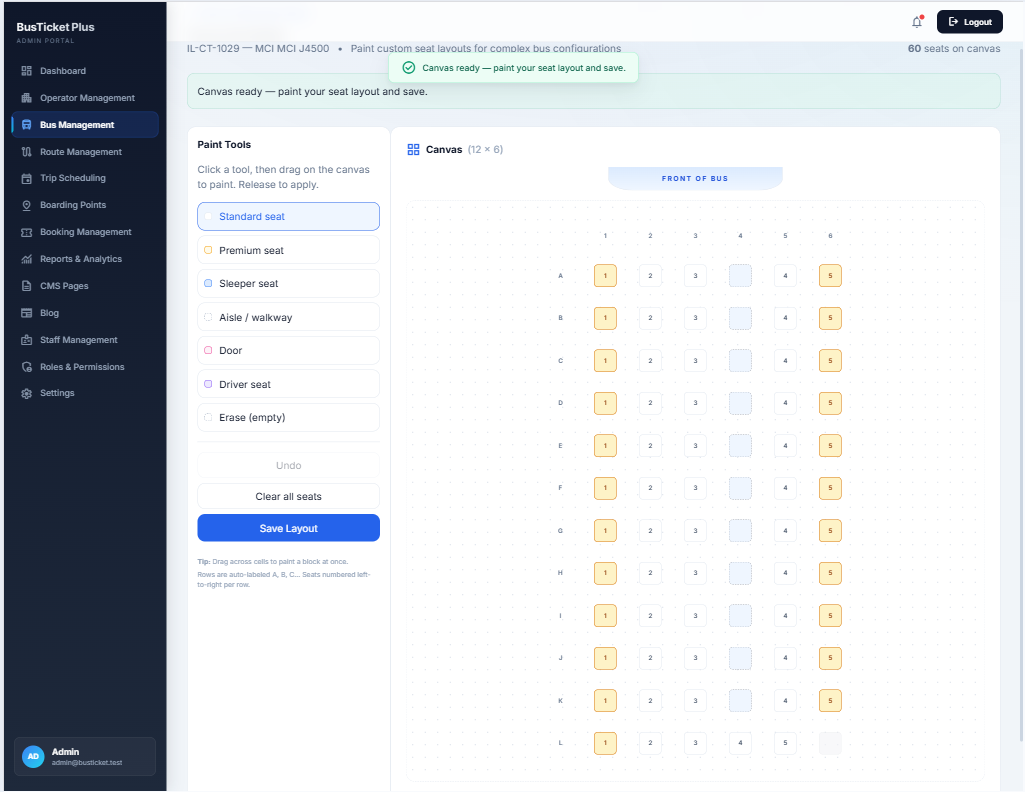
Canvas drag and paint seat layout builder
Fleet

Drag & paint canvas seat builder

Paint complex layouts on a grid: standard, premium, sleeper, aisle, door, and driver cells.

  • Click a tool, then drag on the canvas; rows auto-label A, B, C…
  • Seat counter and FRONT OF BUS orientation marker.
  • Undo, clear all, and Save Layout.
  • Ideal for irregular coaches beyond simple 2×2 presets.
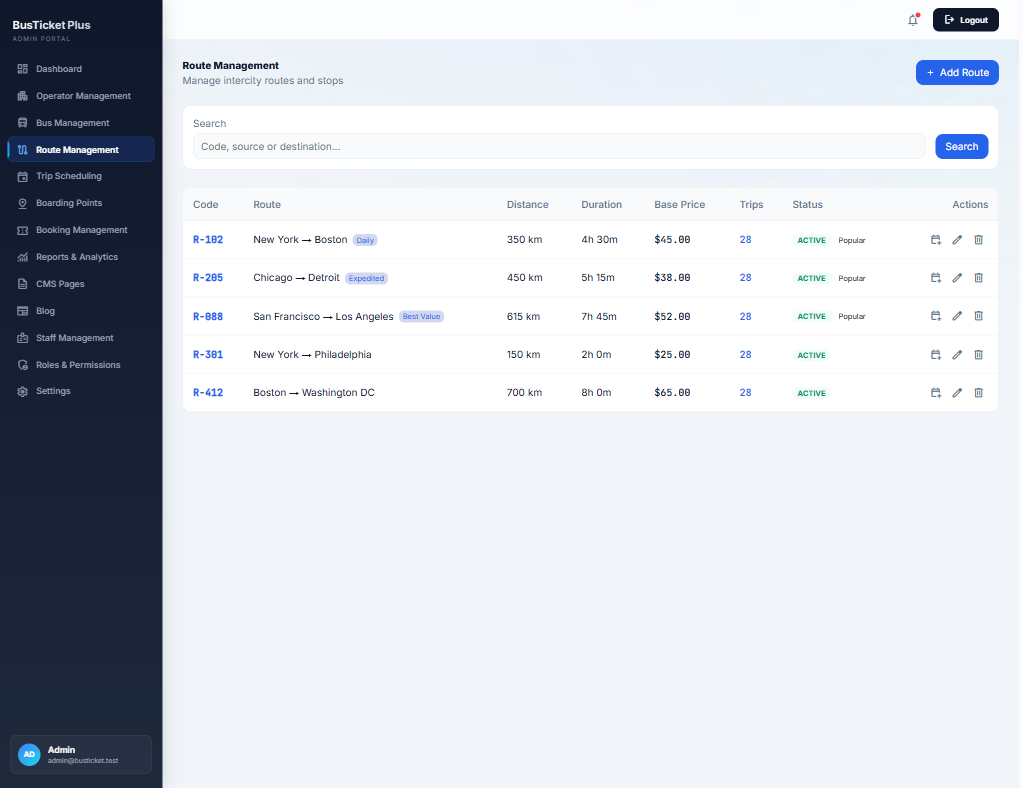
Route management table in admin
Scheduling

Route management

Define intercity routes with distance, duration, base price, and popularity flags.

  • Search by code, source, or destination.
  • Table: code, route label/tags, distance, duration, base price, trip count, status.
  • Mark routes Active / Popular for homepage and search prominence.
  • Actions to schedule, edit, or delete a route.
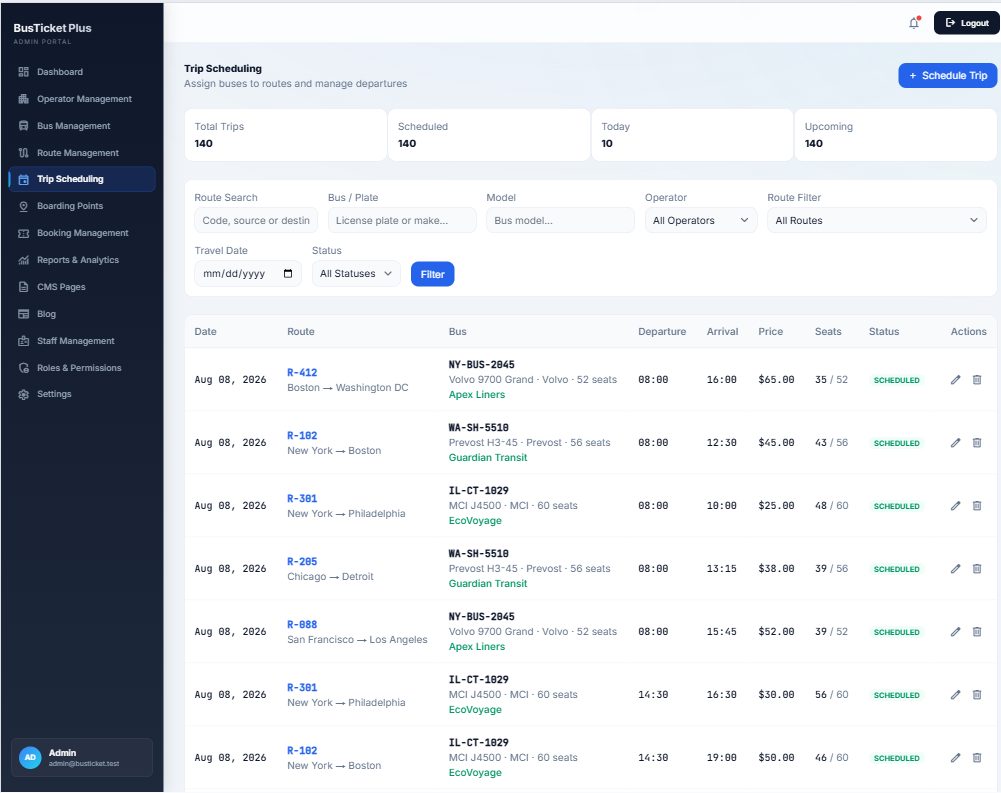
Trip scheduling list with filters
Scheduling

Trip scheduling

Assign buses to routes with departure/arrival times, fare, and seat occupancy.

  • KPIs: total, scheduled, today, upcoming trips.
  • Filters: route text, plate, model, operator, route, date, status.
  • Table shows date, route, bus + operator, times, price, seats filled, status.
  • + Schedule Trip creates departures with booking rules (max seats, cutoff).
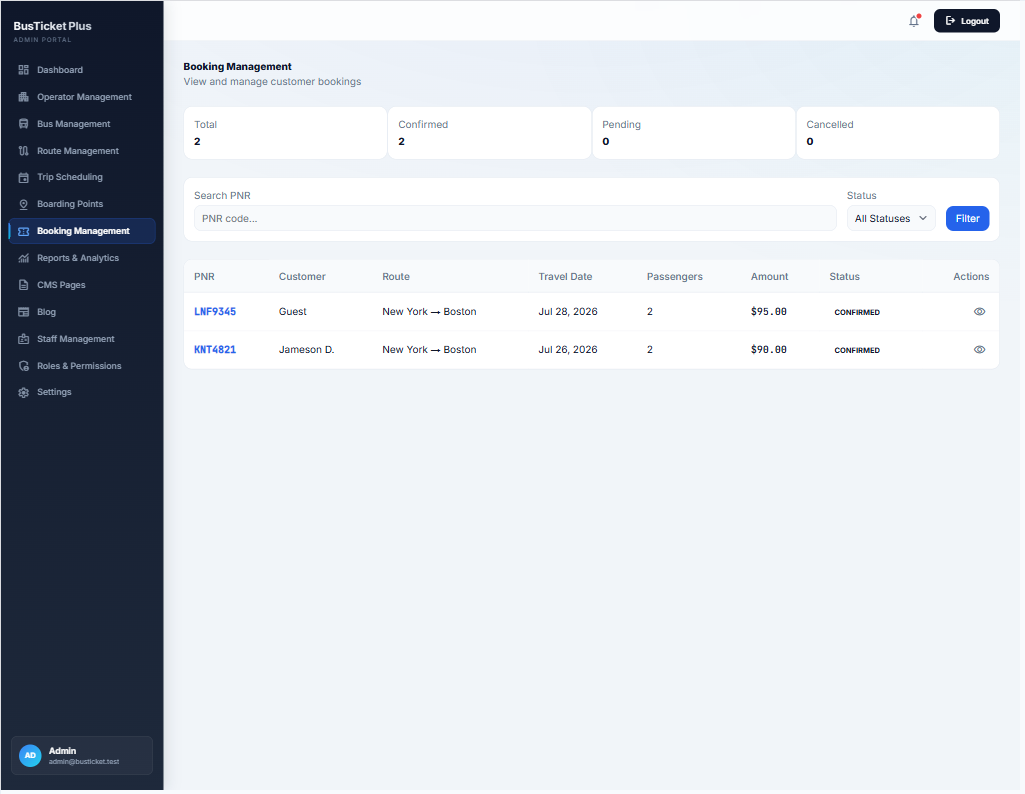
Booking management admin list
Sales

Booking management

Staff search and inspect customer bookings by PNR and status.

  • Counters for total, confirmed, pending, cancelled.
  • Filter by PNR code and booking status.
  • Columns: PNR, customer, route, travel date, passengers, amount, status.
  • View action opens full booking detail for support or counter ops.
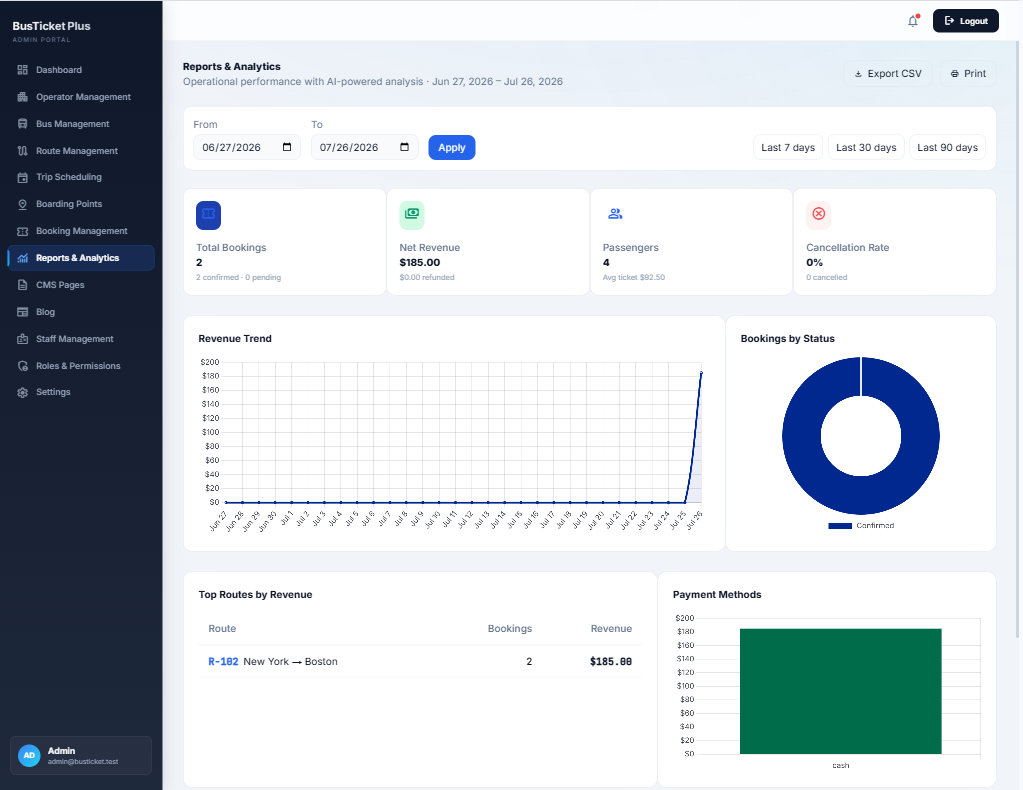
Reports and analytics dashboard
Sales

Reports & analytics

Operational performance for a selected date range with export and print.

  • KPIs: bookings, net revenue, passengers, cancellation rate.
  • Revenue trend, bookings-by-status donut, top routes, payment methods chart.
  • Quick ranges: last 7 / 30 / 90 days; custom from–to.
  • Export CSV and Print for accounting handoff.
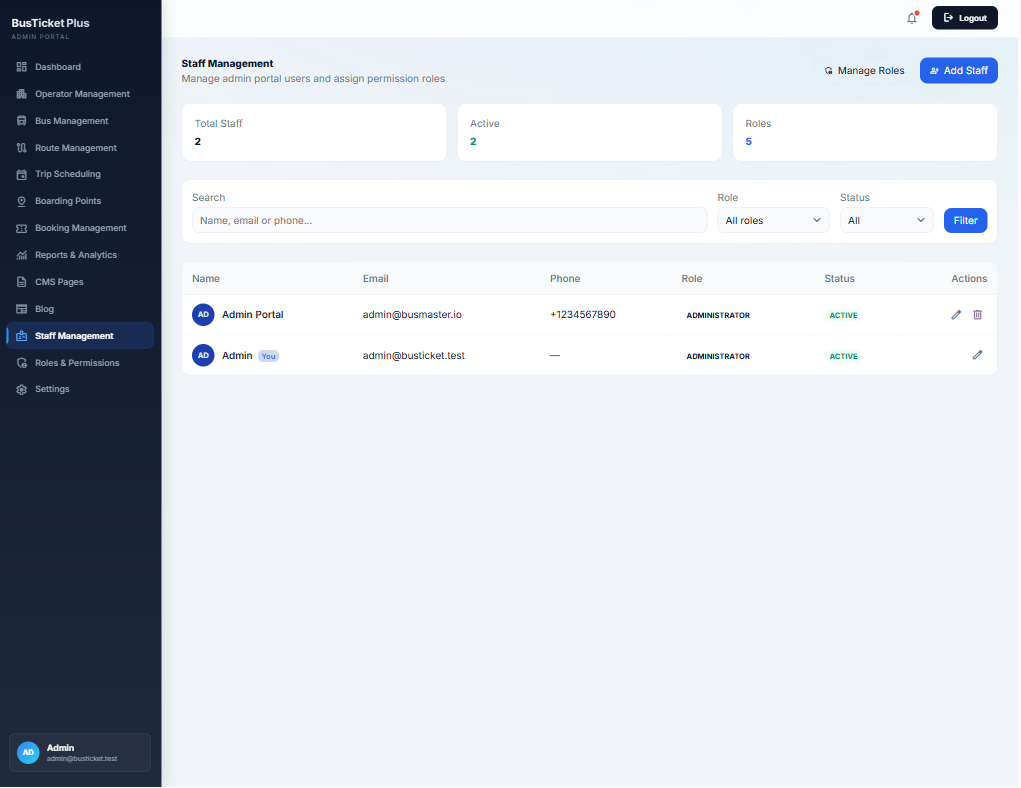
Staff management list with roles
Access control

Staff management

Invite admin-portal users and assign permission roles.

  • Totals for staff, active users, and defined roles.
  • Search by name, email, or phone; filter by role and status.
  • Table shows avatar, contact, role, and active badge.
  • Shortcuts to Manage Roles and Add Staff.
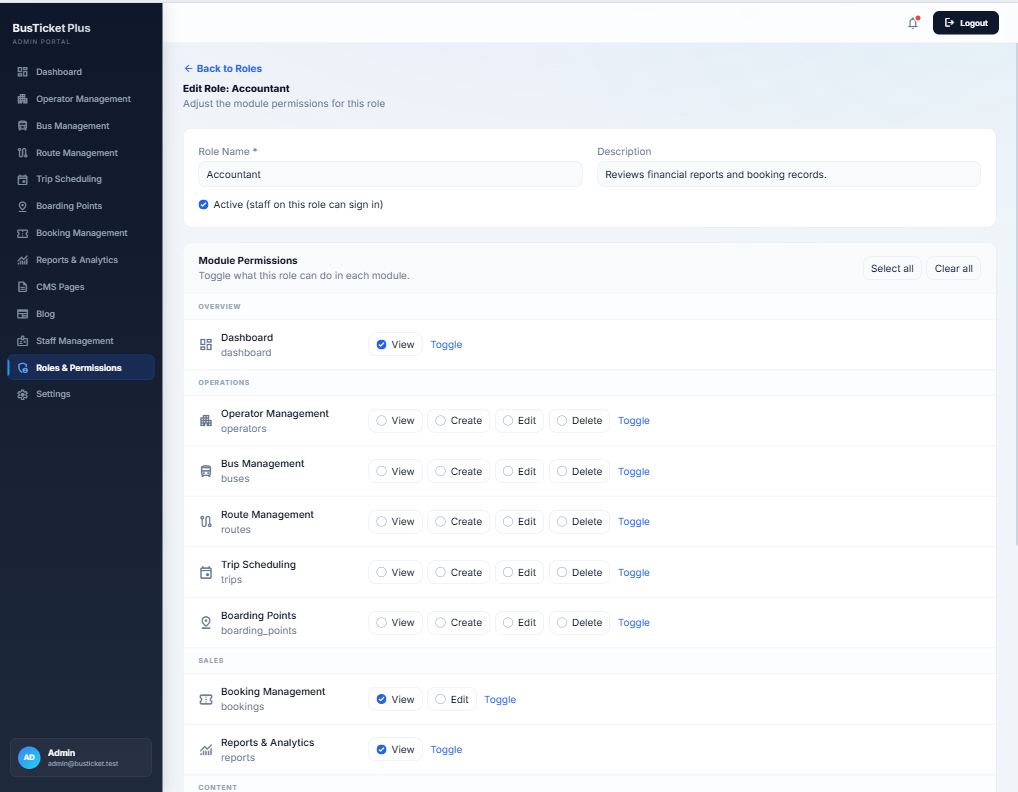
Edit role with module permission matrix
Access control

Roles & module permissions

Granular RBAC: View / Create / Edit / Delete per module, grouped by Overview, Operations, Sales, Content.

  • Role name, description, and Active toggle (controls sign-in).
  • Select all / Clear all for fast setup (e.g. Accountant = bookings view + reports).
  • Per-module toggle links for bulk row changes.
  • Administrators retain full access; custom roles limit staff safely.
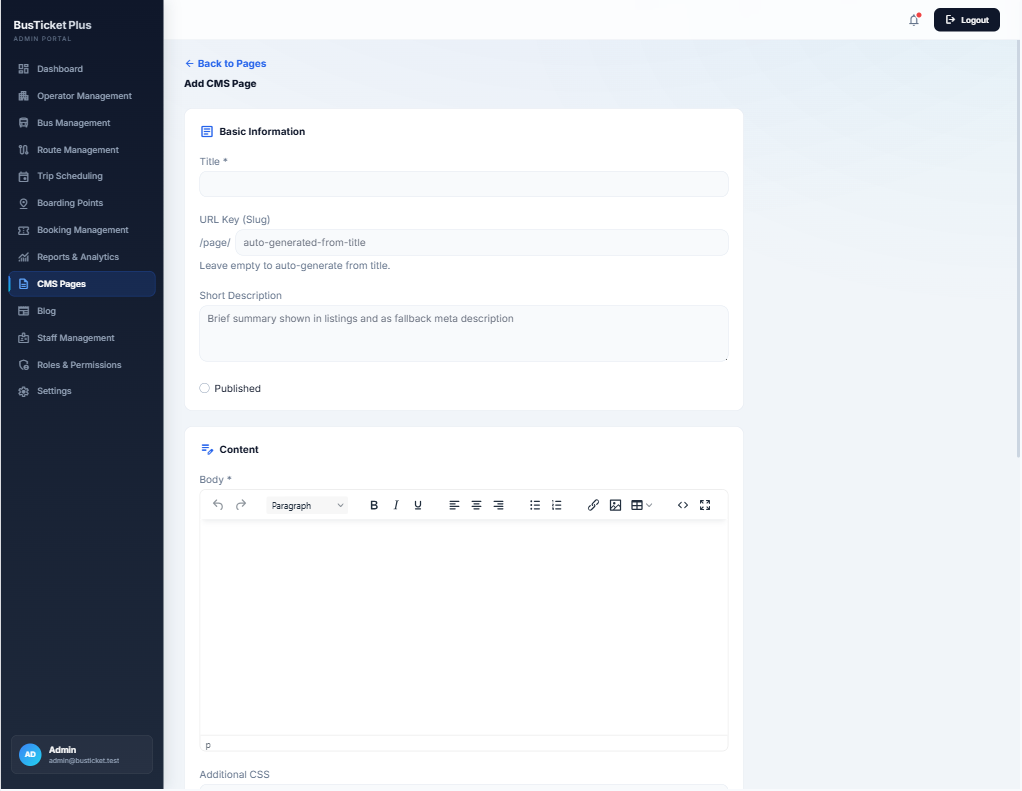
Add CMS page editor in admin
Content

CMS pages

Create static pages (About, Terms, Privacy) with slug, summary, rich body, and optional CSS.

  • Title and URL key under /page/ (auto-slug from title).
  • Short description for listings / meta fallback.
  • WYSIWYG body: headings, lists, links, images, tables, source, fullscreen.
  • Published status controls front-end visibility.
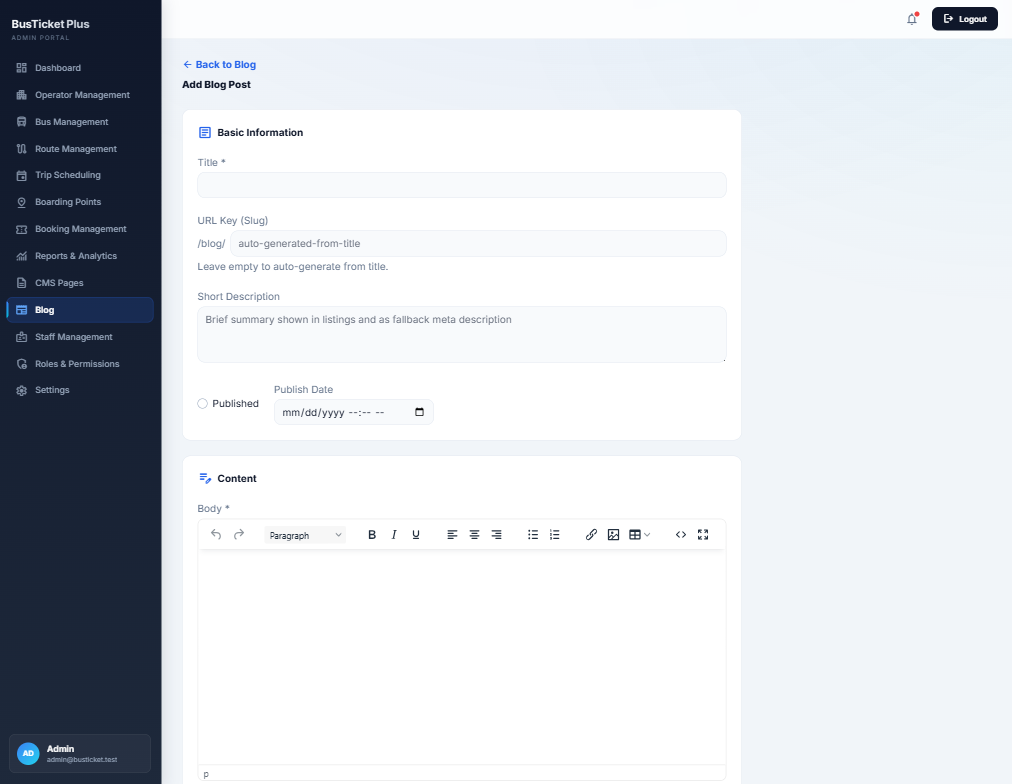
Add blog post editor
Content

Blog posts

Publish travel guides and news under /blog/ with schedule and rich content.

  • Title, auto slug, short description, published flag, publish date/time.
  • Same WYSIWYG tooling as CMS pages.
  • Appears in frontend Blog navigation and footer links.
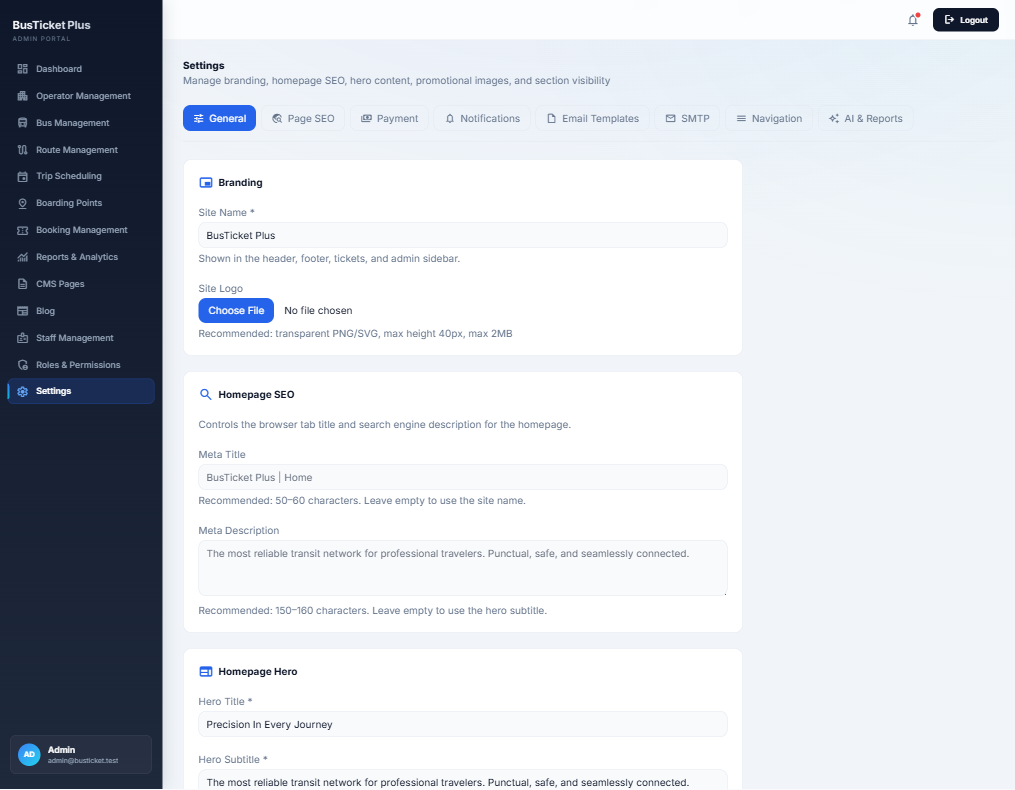
General branding and homepage settings
Settings

Branding & homepage hero

Control site name, logo, homepage SEO, and hero copy from one General tab.

  • Site name used in header, footer, tickets, and admin sidebar.
  • Logo upload (transparent PNG/SVG recommended).
  • Meta title & description for the homepage.
  • Hero title and subtitle shown on the landing search screen.
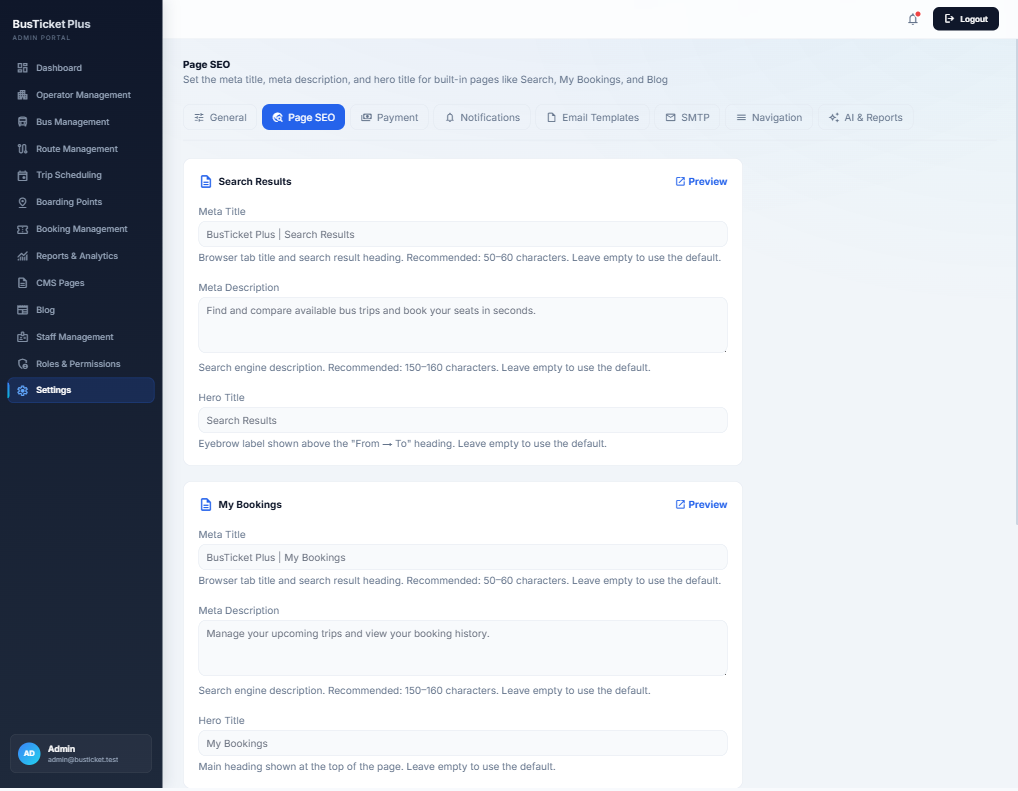
Page SEO settings for built-in pages
Settings

Per-page SEO & hero titles

Set meta title, meta description, and hero/eyebrow text for built-in pages such as Search and My Bookings.

  • Preview link per page card.
  • Character guidance for SEO fields.
  • Leave empty to fall back to defaults.
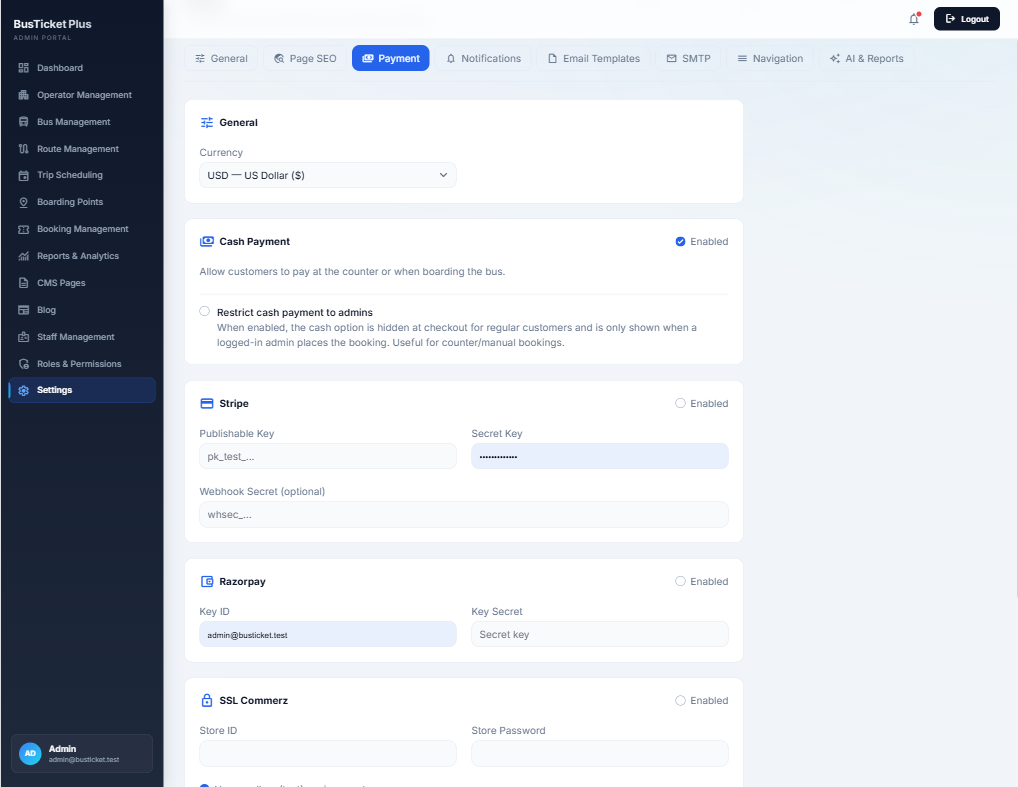
Payment gateway settings
Settings

Payment gateways

Choose currency and enable Cash, Stripe, Razorpay, and/or SSL Commerz with API keys.

  • Cash: pay at counter or boarding; optional admin-only restriction for counter bookings.
  • Stripe: publishable key, secret key, optional webhook secret.
  • Razorpay: Key ID and Key Secret.
  • SSL Commerz: Store ID and Store Password.
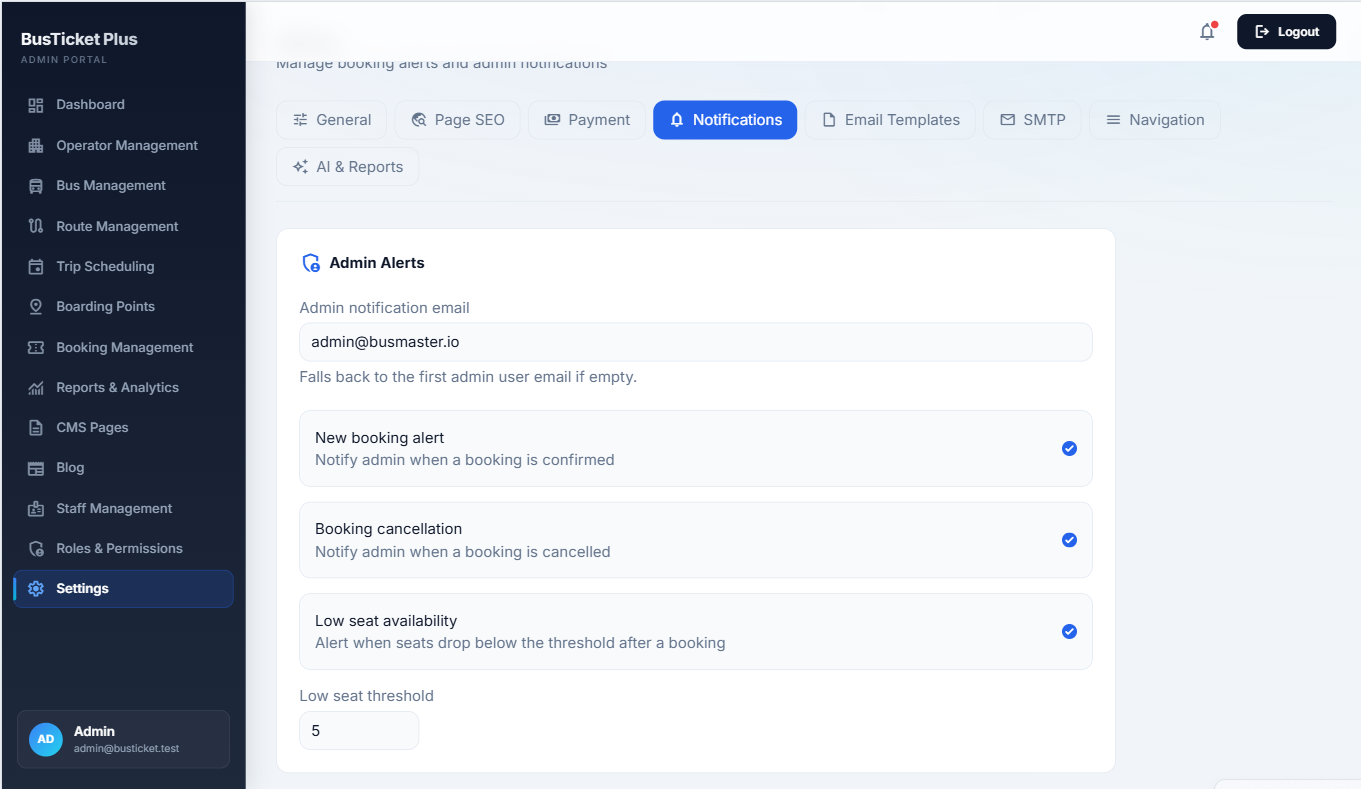
Notification and admin alert settings
Settings

Admin alert notifications

Email admins on key operational events and low inventory.

  • Admin notification email (falls back to first admin if empty).
  • New booking confirmed, booking cancelled, low seat availability.
  • Configurable low-seat threshold (e.g. alert below 5 seats).
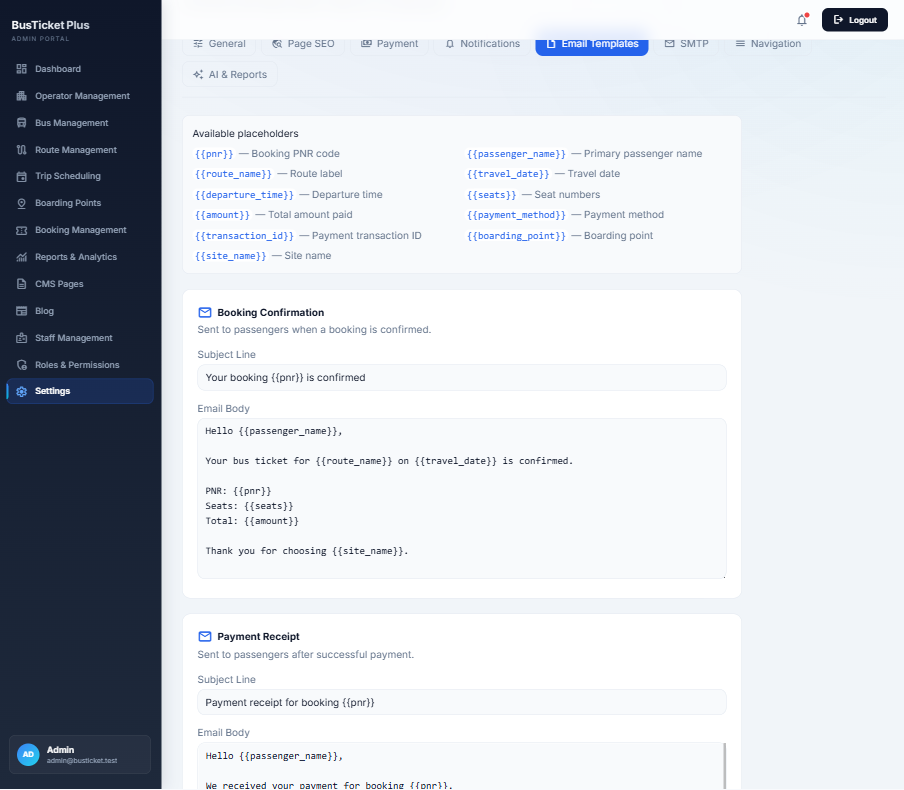
Email template editor with placeholders
Settings

Email templates & merge tags

Customize booking confirmation and payment receipt emails with dynamic placeholders.

  • Placeholders: {{pnr}}, {{route_name}}, {{seats}}, {{amount}}, {{passenger_name}}, and more.
  • Editable subject and body for confirmation and receipt templates.
  • Pairs with SMTP for reliable delivery.
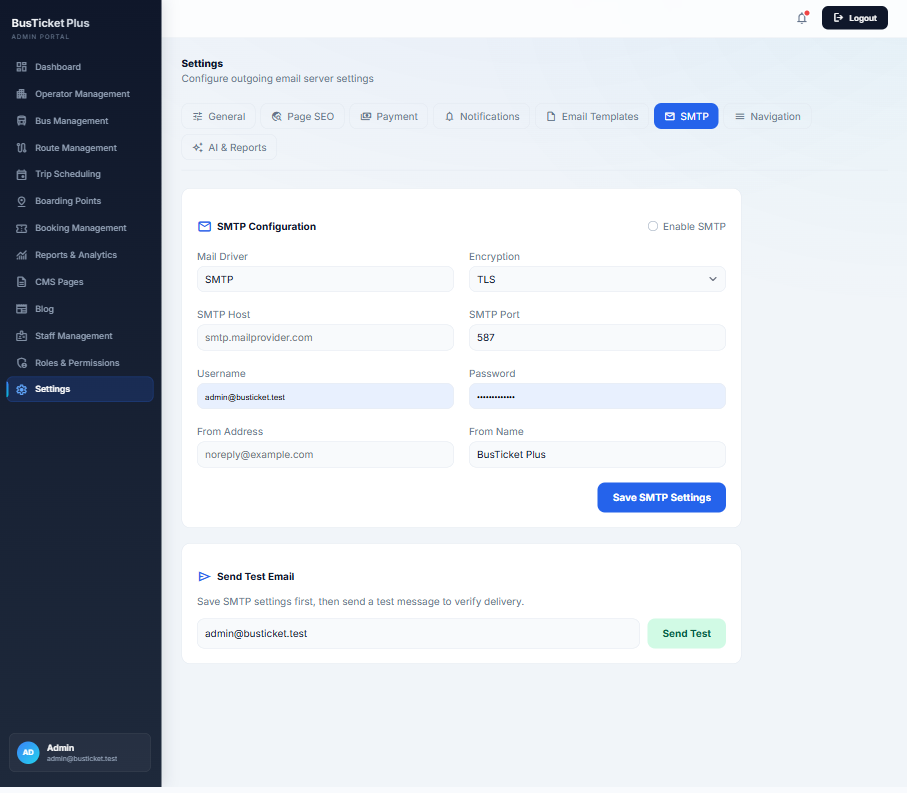
SMTP configuration and test email
Settings

Built-in SMTP

Configure outgoing mail without a separate SMTP plugin, then verify with a test message.

  • Enable SMTP; set driver, encryption (TLS), host, port, username, password.
  • From address and from name for branded mail.
  • Send Test Email after saving to confirm delivery.
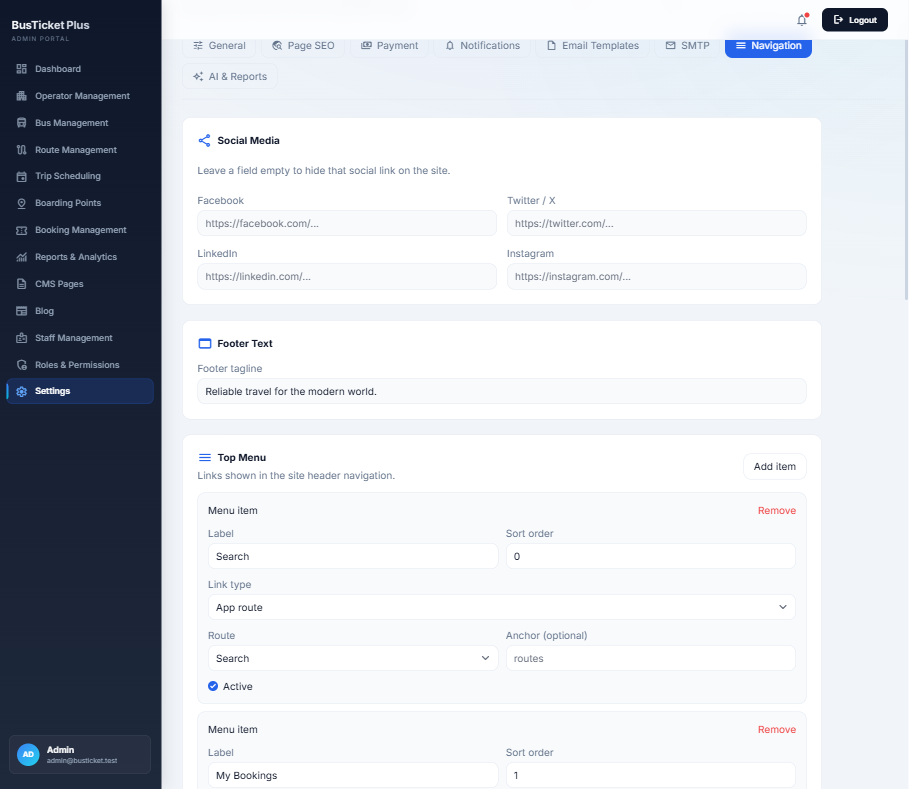
Navigation and social media settings
Settings

Menus, footer & social links

Build the public header menu and footer without code changes.

  • Social URLs (Facebook, X, LinkedIn, Instagram) — empty hides the icon.
  • Footer tagline text.
  • Top menu items: label, sort order, app route or custom link, optional anchor, active flag.
  • Add / remove menu items as needed.
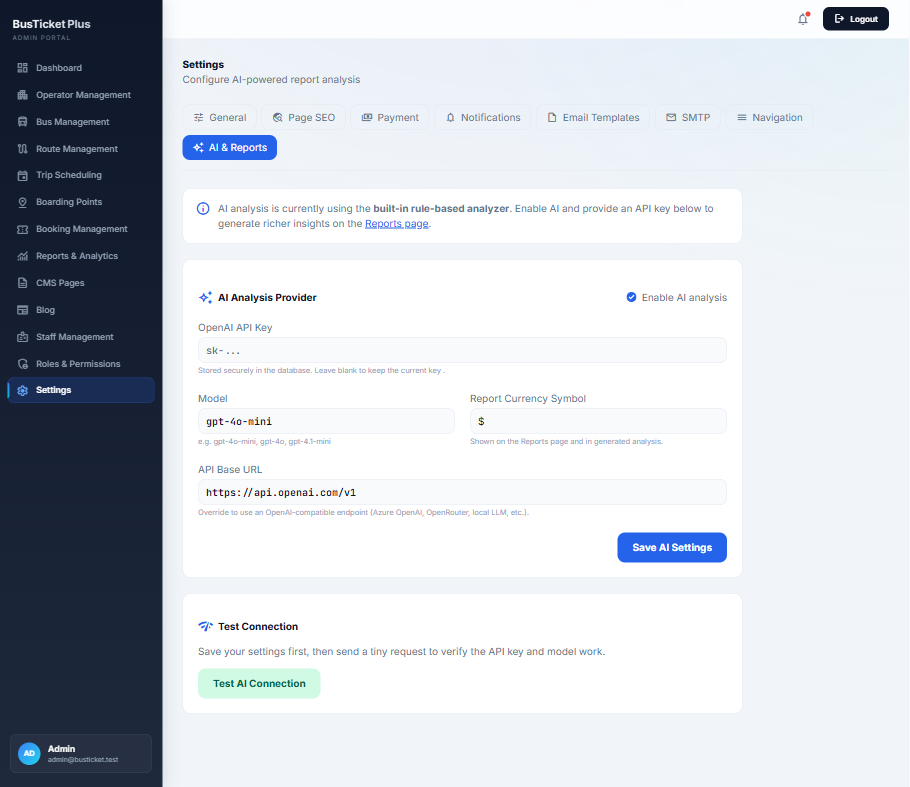
AI and reports settings with OpenAI configuration
Settings

AI-powered report analysis

Optional OpenAI-compatible analysis enriches the Reports page beyond the built-in rule-based analyzer.

  • Enable AI analysis; store API key securely (leave blank to keep existing).
  • Model name (e.g. gpt-4o-mini) and report currency symbol.
  • Custom API base URL for Azure OpenAI, OpenRouter, or local LLMs.
  • Test AI Connection validates key and model after save.

Frequently Asked Questions

Common questions about BusTicket Plus installation, booking flow, and admin setup.

What are the server requirements?

BusTicket Plus needs PHP 8.2+, extensions pdo, mbstring, openssl, tokenizer, json, ctype, fileinfo, curl, xml, bcmath, a MySQL/MariaDB (or compatible) database, and writable storage/, bootstrap/cache/, and .env. Use Apache with mod_rewrite or Nginx with document root set to public/.

How do I install BusTicket Plus?

Upload and unzip the package, point the domain to public/, run Composer if needed, then open /install. Complete Welcome → Requirements → Database → Site & Admin. Optionally import demo data. Log in at /admin/login. Keep storage/app/installed.lock on the server.

What is the recommended setup order after install?

Configure Settings (branding, currency, SMTP, payments), then Operators, Buses (seat layouts), Boarding Points & Routes, then Trip Scheduling. Finish with a test booking on the frontend.

How does the customer booking flow work?

Customers search by from/to/date, refine results, select seats on the map, enter passenger details and boarding/dropping points, pay (or choose cash), then receive confirmation with PNR and a printable digital ticket with QR.

What payment gateways are supported?

Under Settings → Payment you can enable Cash (optionally admin-only for counter sales), Stripe, Razorpay, and SSL Commerz. Set the store currency on the same screen.

How do I design bus seat layouts?

Open a bus → seat layout. Use preset patterns (2×2, 1×2, etc.) with row count and last-row style, or open the Canvas Seat Builder to paint standard, premium, sleeper, aisle, door, and driver cells. Layouts with active bookings cannot regenerate seats until those bookings are cleared.

How do staff roles and permissions work?

Create roles under Roles & Permissions with module-level View / Create / Edit / Delete. Assign a role when adding staff. Inactive roles cannot sign in. Administrators keep full access.

Can I customize emails and delivery?

Yes. Configure SMTP under Settings → SMTP and edit confirmation/receipt templates under Email Templates using merge tags such as {{pnr}} and {{passenger_name}}. Use Send Test Email to verify.

What does the AI reports feature do?

Reports always include charts and CSV export. Enabling Settings → AI & Reports with an OpenAI-compatible API key adds richer narrative insights on the Reports page. You can point the base URL at Azure OpenAI, OpenRouter, or a local LLM.

Is this a multi-vendor marketplace?

No. BusTicket Plus is a single-vendor booking platform: one operator organization manages fleet, routes, and sales. You can still model multiple bus operator brands inside that single deployment.

BusTicket Plus installation wizard welcome step
Server requirements check during installation
Database connection step in the installer
Site and administrator setup with demo data option
BusTicket Plus customer homepage with search widget
Bus search results with filters and trip cards
Interactive seat selection with booking details sidebar
Passenger information and boarding point form
Secure payment step with cash option and coupon
Booking confirmation with PNR and QR code
Digital boarding pass ticket with print action
Admin portal dashboard with KPIs and charts
Operator management list in admin portal
Bus management fleet table
Manual preset seat layout configuration
Canvas drag and paint seat layout builder
Route management table in admin
Trip scheduling list with filters
Booking management admin list
Reports and analytics dashboard
Staff management list with roles
Edit role with module permission matrix
Add CMS page editor in admin
Add blog post editor
General branding and homepage settings
Page SEO settings for built-in pages
Payment gateway settings
Notification and admin alert settings
Email template editor with placeholders
SMTP configuration and test email
Navigation and social media settings
AI and reports settings with OpenAI configuration

More products

Explore the collection

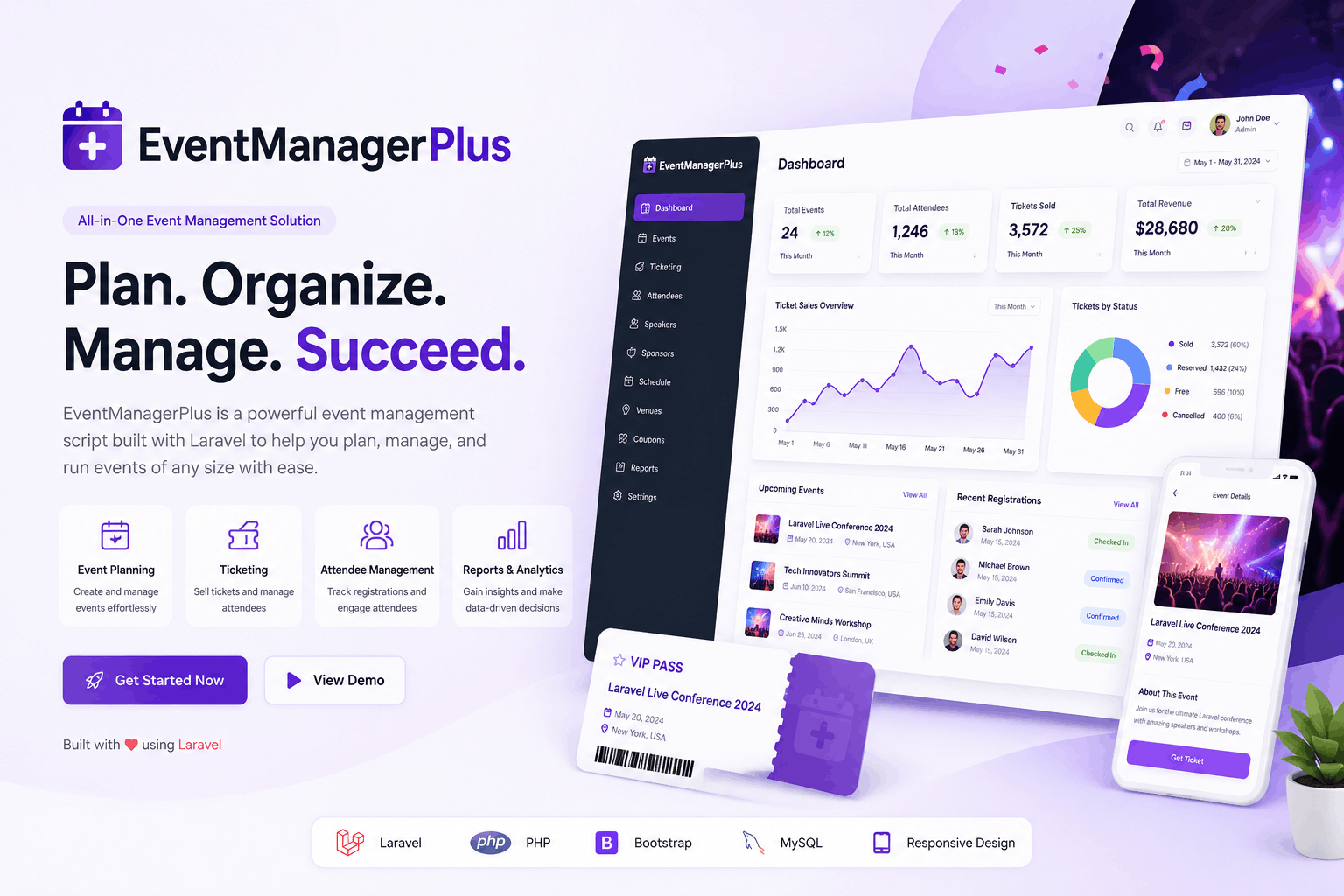
Event Manager Plus

Laravel Event Management

Event Manager Plus

Event Manager Plus is a Laravel-based event management and ticketing platform to create events, sell tickets, manage bookings, and handle QR-based check-ins with multiple payment gateways.It includes a modern public site, powerful admin dashboard, easy web installer, and optional AI features for reporting and event assistance.

$79.00 /year
View product
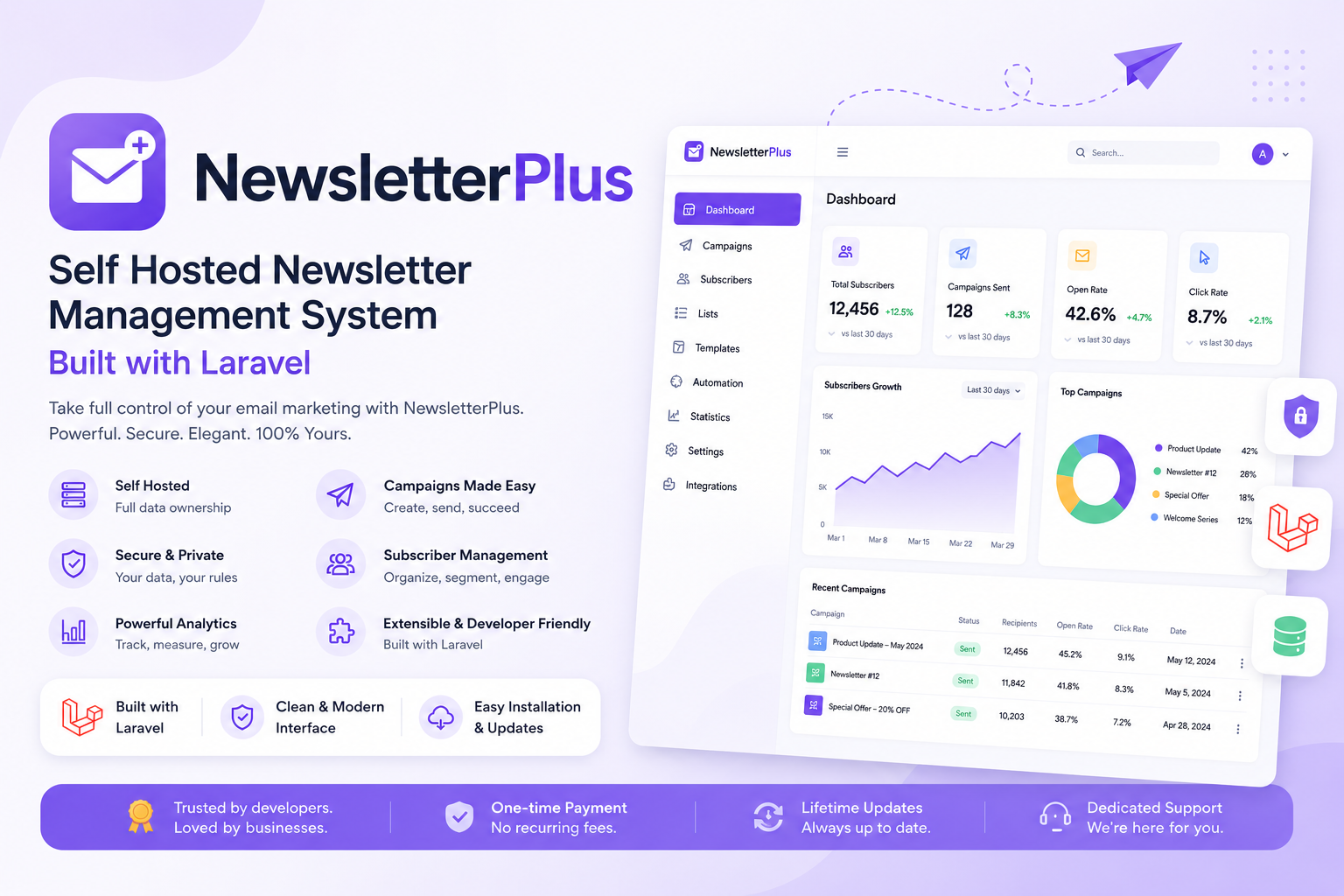
Newsletter Plus

Laravel Newsletter

Newsletter Plus

A complete self-hosted email marketing & newsletter platform — campaigns, visual email builder, subscriber management, automation workflows, and signup forms, all running on your own server with no recurring SaaS fees.

$59.00 /year
View product
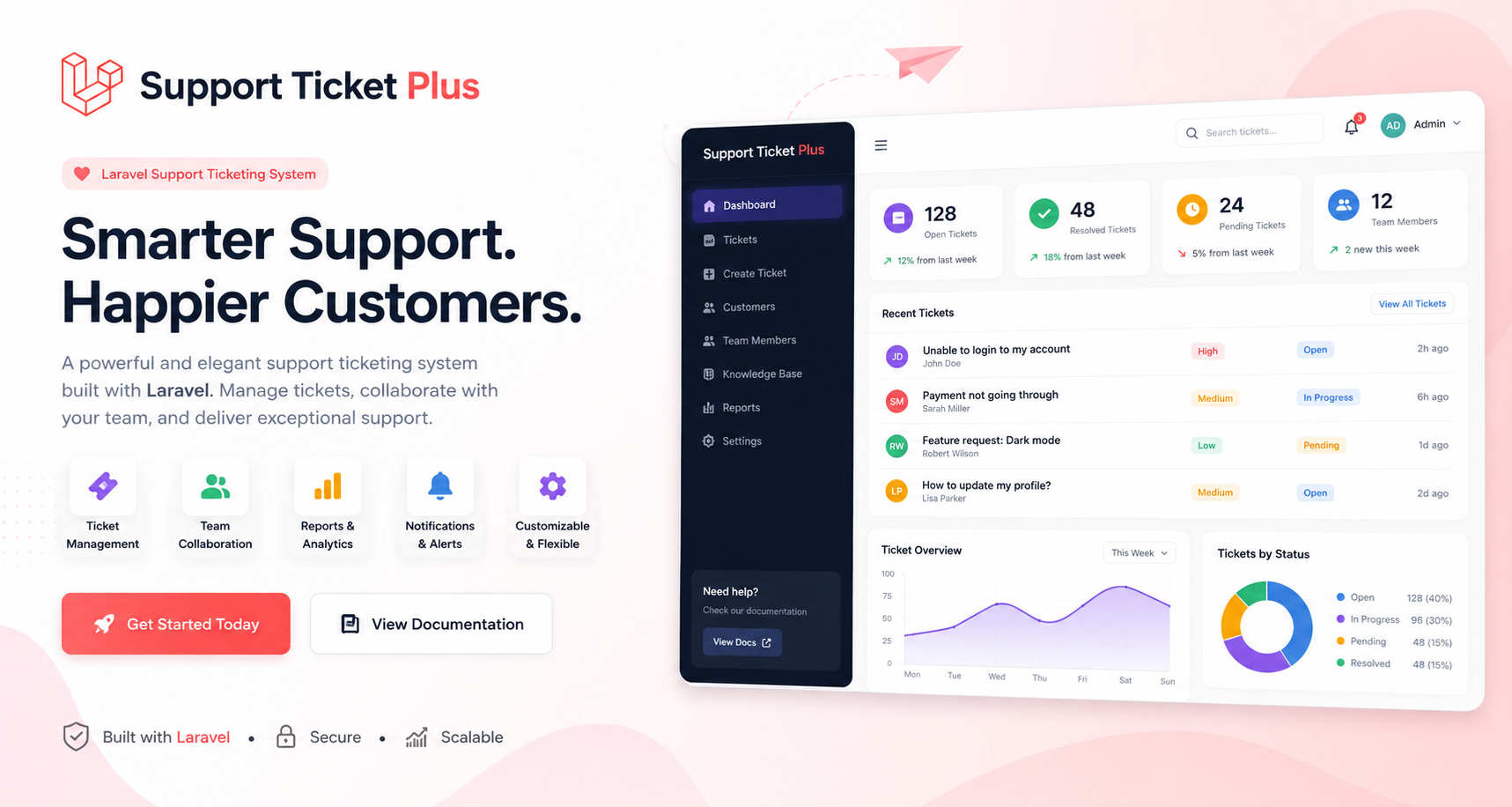
Support Ticket Plus – Complete Laravel Ticketing System

Laravel Support Ticket

Support Ticket Plus – Complete Laravel Ticketing System

A complete help desk and ticket management system for teams of any size — with role-based access, email-to-ticket, AI reply suggestions, knowledge base, SLA reports, and free installation support. The Lucrative team will help with your installation.

$29.00 /year
View product

Ready to get started?

BusTicket Plus – Online Bus Ticket Booking Laravel Script

Choose your plan above and purchase instantly, or scroll back up to review pricing and included benefits.

Purchase Now